
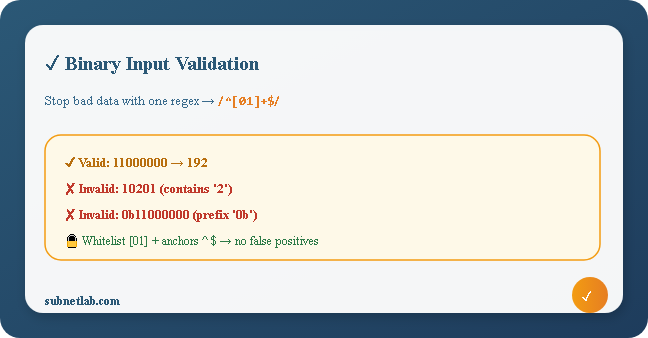
So you’re building a tool, something that takes binary input from a user. Maybe a subnet calculator, a number base converter, or a teaching tool for a networking course.
Then a user types 10201 into the field and hits submit. Your converter dutifully tries to process it. That’s not ideal.
This happens all the time. It’s the default outcome when binary input fields lack proper input sanitization. But the fix? Way simpler than most developers expect.
A solid validator needs exactly one regular expression, a few lines of error handling, and a clear mental model of the edge cases that can slip through.
This guide covers the full picture: what makes a binary string valid, how to write the regex that catches everything invalid, how to implement it in JavaScript, Python, and PHP, and the sneaky edge cases—empty strings, whitespace, leading zeros, and mixed-base prefixes that catch developers off guard.
| Key Insight
“A converter that accepts bad input and produces wrong output is not a converter; it’s a confusion machine. Validation isn’t optional. It’s the first layer.” |
What Actually Defines a Valid Binary String?
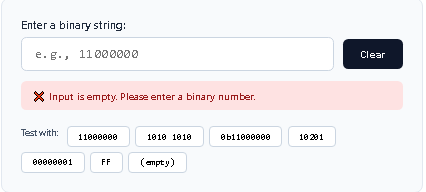
Before writing any validation code, let’s get precise. A valid binary number is a non-empty string made exclusively of the characters 0 and 1. That’s it.
Everything else is invalid. In practice, people type things that look almost binary but aren’t. The table below shows the most common offenders.
| Input | Looks Valid? | Actually Valid? | Failure Type |
| 11000000 | ✅ Yes | ✅ Yes | — |
| 1010 1010 | Yes | ❌ No | Contains a space |
| 0b11000000 | Yes | ❌ No | Includes 0b prefix |
| 10201 | No | ❌ No | Contains digit 2 |
| FF | No | ❌ No | Hex in wrong field |
| (empty) | — | ❌ No | No digits |
| 00000000 | ✅ Yes | ✅ Yes | Leading zeros are fine |
| 1.0 | No | ❌ No | Decimal point |
| 1010 | — | Depends | Sign only if your spec allows |
| False Positive Trap
parseInt(“0b11”, 2) returns 0, not an error. JavaScript’s parseInt stops at the ‘b’ and silently returns 0. Always validate the raw string first before any parsing. |
The Core Regular Expression for Binary Validation
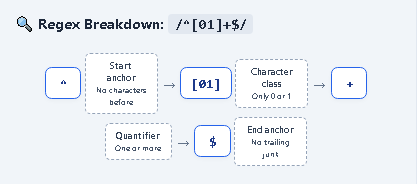
A regex is the cleanest approach, portable, readable, and concise. The canonical pattern for binary input validation is:
/^[01]+$/
Here is what each component does:
| Component | Meaning |
| ^ | Start of string: no characters allowed before |
| [01] | Only 0 or 1 whitelist approach |
| + | One or more; reject empty strings |
| $ | End of string, no trailing junk |
Both anchors are non-negotiable. Without ^, the string abc1xyz would pass. Without $, a valid prefix with trailing garbage would pass.
Length-Constrained Variants
Need exactly 8 bits?
/^[01]{8}$/
Need 1 to 32 bits (like SubnetLab’s IPv4 limit)?
/^[01]{1,32}$/
JavaScript Implementation: Live Feedback, No Frustration
JavaScript is ideal for client-side validation. Validate on every keystroke to give immediate feedback — don’t make users wait until form submission to discover an error.
Validator Function
function validateBinaryInput(input) {
if (typeof input !== ‘string’) {
return { valid: false, error: ‘Must be a string.’ };
}
if (input.length === 0) {
return { valid: false, error: ‘Please enter a binary number.’ };
}
if (input.length > 32) {
return { valid: false, error: ‘Maximum 32 binary digits allowed.’ };
}
if (!/^[01]+$/.test(input)) {
return { valid: false, error: ‘Only 0s and 1s allowed.’ };
}
return { valid: true, error: null };
}
Wiring Up the Event Listener
inputEl. addEventListener(‘input’, () => {
const { valid, error } = validateBinaryInput(inputEl.value);
errorEl.textContent = valid ? ” : error;
submitBtn.disabled = !valid;
});
Python Implementation: Server-Side Validation
Client-side validation is convenient but never sufficient. Anyone can bypass the browser and POST anything directly to your endpoint. Always validate on the server too.
import re
BINARY_PATTERN = re.compile(r’^[01]+$’)
def validate_binary_input(value: str, max_length: int = 32):
if not isinstance(value, str):
return False, “Input must be a string.”
if not value:
return False, “Input is empty.”
if len(value) > max_length:
return False, f”Maximum {max_length} binary digits allowed.”
if not BINARY_PATTERN.match(value):
return False, “Only characters 0 and 1 are permitted.”
return True, None
PHP Implementation: For WordPress & Shared Hosting
PHP is ubiquitous in networking tools, especially on shared hosting environments. Here is a production-ready binary validator:
function validateBinaryInput($input, int $maxLength = 32): array {
if (!is_string($input)) {
return [‘valid’ => false, ‘error’ =>’Input must be a string.’];
}
if (strlen($input) === 0) {
return [‘valid’ => false, ‘error’ => ‘ Please enter a binary number.’
}
if (strlen($input) > $maxLength) {
return [‘valid’ => false, ‘error’ => ” Maximum {$maxLength} binary digits allowed.”];
}
if (!preg_match(‘/^[01]+$/’, $input)) {
return [‘valid’ => false, ‘error’ =>’Only 0s and 1s are allowed.’];
}
return [‘valid’ => true, ‘error’ => null];
}
Edge Cases That Break Naive Validators
Four edge cases cause the majority of real-world bugs in binary validation. Each one has tripped up developers who thought their validator was complete.
- Empty Strings
If you use /^[01]*$/ (star quantifier), an empty string passes. That is wrong. Use + (one or more). Handle empty fields separately with a clear message.
- Whitespace in Input
Users frequently copy binary from documentation: “11000000.” The [01] character class correctly rejects spaces. If you want to support spaced input, strip whitespace first but inform the user you are doing so.
- Leading Zeros
00000001 is a valid binary number — it represents the decimal 1 as an 8-bit octet. Do not strip leading zeros. That would break subnetting examples and change the numerical value.
- Language Prefixes (0b…)
The 0b prefix is legal in JavaScript, Python, and most languages for binary literals in source code. Some users type it because they have seen it in documentation. Your regex rejects it because ‘b’ is not 0 or 1, but your error message should explicitly mention the prefix.
| Edge Case | Example | Correct Behavior | Common Mistake |
| Empty string | “” | Reject:’ Enter a value.’ | Using * in regex passes silently |
| Whitespace | “1 100 000 0” | Reject or strip & notify | Passing to parseInt returns partial |
| Leading zeros | “00000001” | Accept as valid | Stripping zeros changes the value |
| Language prefix | “0b11000000” | Reject, explain prefix | parseInt returns 0 silently |
How SubnetLab Implements Binary Validation
SubnetLab’s binary-to-decimal converter enforces all these rules in layers. Here is what happens under the hood:
- Character filtering at the DOM level—Press 2, a, or space? Nothing happens. The character never enters the field.
- 32-digit hard limit — Inputs longer than 32 bits are truncated to prevent overflow.
- Empty-field guard—Clicking convert with an empty field shows a prompt, not a fake 0 result.
- Step-by-step output — After validation, the tool shows which bit positions contributed to the result.
The result: the tool literally cannot produce a wrong answer from bad input. Validation runs first. Conversion only ever sees clean binary.
Writing Good Error Messages: Because “Invalid” Is Useless
The regex is the easy part. Telling users what went wrong is where most tools fall short. A generic “invalid input” message is technically correct and completely useless.
Good error messages do three things: identify what is wrong, state what is allowed, and suggest a fix.
| Input Received | Poor Message | Better Message |
| 10201 | “Invalid input.” | “The character ‘2’ is not valid. Binary only has 0 and 1.” |
| 0b11000000 | “Invalid characters.” | “Remove the ‘0b’ prefix — enter just the digits, like 11000000.” |
| 1100 0000 | “Invalid input.” | “Spaces not allowed. Try: 11000000.” |
| (empty) | “Error.” | “Please enter a binary number. Example: 11000000” |
Binary Validation in APIs: Never Trust the Client
If your binary input comes from a REST API, a form POST, or a webhook, validate on the server every time. Client-side validation is for user convenience — not security.
A malicious client can send anything. A payload like “; DROP TABLE sessions; –” won’t convert to binary very nicely. Return structured JSON errors for API consumers:
{
“success”: false,
“error”: {
“code”: “INVALID_BINARY_INPUT”,
“message”: “Only 0 and 1 allowed.”,
“received”: “10201”,
“position”: 2
}
}
The position field lets your frontend highlight the exact bad character a small detail that dramatically improves developer experience when integrating your API.
Frequently Asked Questions About Binary Input Validation
Q: Why not just use parseInt(input, 2) and check for NaN?
Because parseInt doesn’t validate — it parses permissively. parseInt(“0b11”, 2) returns 0. parseInt(“1100 0000”, 2) returns 12. No NaN, but both are wrong. Always validate the raw string first.
Q: Are leading zeros valid in binary?
Yes. 00000001 is a valid binary for decimal 1 as an 8-bit octet. Never strip leading zeros.
Q: Should I use + or * in my regex?
Use + (one or more). The * quantifier allows empty strings, which are not valid binary numbers. Handle the empty case separately if needed.
Q: What is character whitelisting?
Whitelisting defines exactly what is allowed—in this case [01]—and rejects everything else. This is safer than blacklisting, because you cannot predict every malformed Unicode character or encoding trick a user might paste.
Q: Does SubnetLab validate on the server too?
SubnetLab’s converter runs entirely client-side (no API), so DOM-level filtering and the pre-conversion guard are sufficient. For any API-based tool, server-side validation is mandatory.
Further Reading on SubnetLab
Binary validation is one layer of a larger toolset. If you are building networking tools, these related guides may help:
- Binary to Decimal Converter — Live tool with step-by-step output
- IPv6 Validator — More complex validation for IPv6 address formats
- Wildcard Mask Calculator — How validated binary masks work in ACLs
- Subnetting for Beginners — The bigger picture where binary validation matters
Final Thought
The regex /^[01]+$/ is eleven characters. It takes about four seconds to type.
But understanding why each character is there and why missing any one of them breaks everything is what separates a tool that confidently handles user input from one that silently processes garbage and returns confident nonsense.
Binary validation is small. But it’s the kind of small thing that, done right, makes every other part of your tool trustworthy.
Author Profile

-
Muhammad Kazim Ali – Owner & Principal Engineer at SubnetLab.com (real-world networking labs).
10+ years in routing, switching & infrastructure design. Helps students, pros & enterprises master networking via practical labs. Based in Lahore, works with ISPs, data centers & tech teams.
📞 +92 343 5201037 (WhatsApp) | ✉️ subnetlab.official@gmail.com | 🌐 subnetlab.com
Latest entries
 Network BlogAugust 25, 2026TCP/IP Model and Network Protocols Explained:TCP, UDP, ICMP, Handshakes, Flags, and Data Flow
 Network BlogAugust 11, 2026Router vs Calculator Showing Different Subnets? Why & the Fix
 Network BlogAugust 6, 2026Supernetting Explained: The Opposite of Subnetting
 Network BlogAugust 5, 2026Ping Command Explained:Your First Tool for Network Troubleshooting