
You know that feeling when you’re staring at a subnet mask, and you know the wildcard is wrong? But you’re not sure how wrong?
Yeah. Me too.
That’s exactly why I built the habit of using the wildcard mask calculator above. It’s clean, simple, and does exactly what it says: no bloated interface, no ads getting in the way of the actual math.
What Is a Wildcard Mask Calculator?
A wildcard mask calculator converts between subnet masks, CIDR prefixes, and wildcard masks in seconds. Instead of manually inverting bits, you enter one value, and the tool instantly returns the other formats, along with useful details like total IPs, host bits, and network bits.
What You Can Do With This Tool
- Enter a subnet mask value (example:(255.255.255.0)
- Use common preset masks:/16,24/ 28/ , plus wildcard values like 0.0.0.255 and 0.0.255.255
- Switch between three conversion modes: Subnet Mask → Wildcard, CIDR → Wildcard, and Wildcard → Subnet
- Press Calculate to get instant results, or Clear to start over
- View a results table showing subnet mask, wildcard mask, and CIDR prefix
- See supporting stats: total IPs, host bits, and network bits
- Download your results as a table for documentation
It’s exactly what you need for quick, accurate conversions, and nothing you don’t.
Why Use a Wildcard Mask Calculator Instead of Manual Calculation
Look, I love manual subnetting. It keeps my brain sharp. But when I’m in the middle of configuring an ACL on a production router, I don’t have time to invert binary bits in my head.
Here’s where this tool earns its place.
1. It Converts Both Ways (and That’s Rare)
Most calculators only go from subnet mask to wildcard. This one works the other direction too. Type in a wildcard mask and get the subnet mask back, or type /27 and get both formats at once. That’s genuinely handy when you’re reverse-engineering someone else’s configuration.
2. Quick-Select Buttons Save Time
The preset buttons for common values like 255.255.254.240,/24 and 0.0.255.255 mean one tap and you’re done. No typing, no fat-finger errors. I once mistyped 255.255.255.248 as 255.255.255.284 while working under pressure a mistake that’s easy to avoid when you can just click a preset instead.
3. It Shows You the “Why” With IP and Host Bits
After each calculation, the tool also displays total IPs, host bits, and network bits. This isn’t just extra clutter. Seeing these numbers next to your result helps you sanity-check your work and actually understand what the mask means, not just memorize the output.
4. Download Results as a Table
You can export your output directly. This is great for documentation — I’ve pasted these tables into change requests, and having the numbers laid out clearly means nobody ever has to ask “are you sure?”
Real-World Scenarios: When You’d Actually Use This Tool
Here are three examples from real troubleshooting sessions, not just theory.
Scenario 1: OSPF Network Statement
I needed to add 10.22.45.0/23 to an OSPF configuration but wasn’t fully confident on the wildcard. I entered 255.255.254.0 into the calculator and got 0.0.1.255 back instantly. Confirmed in three seconds, without pulling out a notepad.
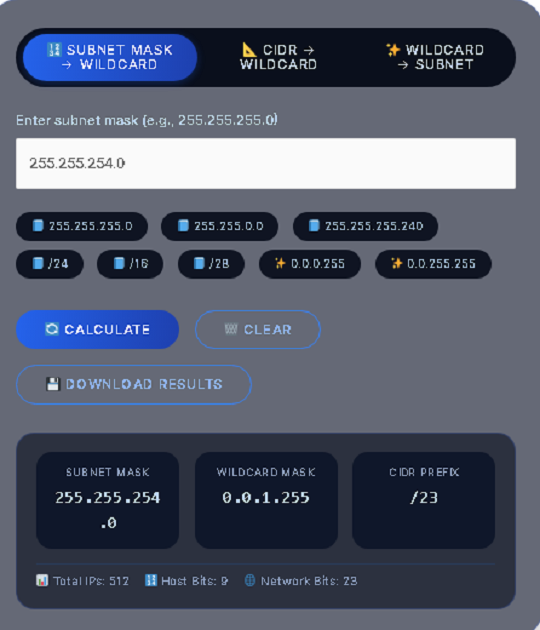
Scenario 2 ACL for a weird subnet
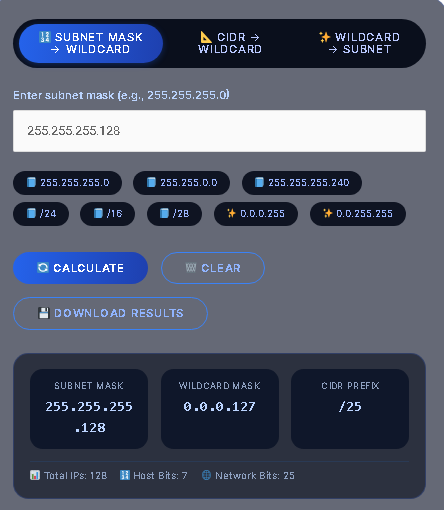
A coworker handed me the subnet 192.168.100.0 with a mask of 255.255.255.128 and asked for the wildcard for an inbound deny rule. The tool returned 0.0.0.127 immediatelyexactly right.
Scenario 3: Studying for a Certification Exam
While preparing for a networking certification, I used the quick-select buttons to drill CIDR-to-wildcard conversions. Click a preset, check the answer, move to the next one. It’s a faster way to build pattern recognition than flipping through a textbook.
Wildcard Mask vs Subnet Mask: What’s the Difference?
A wildcard mask and a subnet mask look similar but serve opposite purposes.
A subnet mask defines which bits identify the network, while a wildcard mask defines which bits Cisco devices should ignore when matching traffic in ACLs and routing protocols.
| Feature | Subnet Mask | Wildcard Mask |
|---|---|---|
| Purpose | Defines network vs. host portion | Defines which bits to match or ignore |
| Bit logic | 1 = network bit | 0 = must match exactly |
| Bit logic (inverse) | 0 = host bit | 1 = ignore this bit |
| Used in | IP addressing, subnetting | ACLs, OSPF, EIGRP network statements |
| Example (/24) | 255.255.255.0 | 0.0.0.255 |
| Calculation | Direct from CIDR | Inverse of the subnet mask |
How to Calculate a Wildcard Mask Manually
Even though the tool does this instantly, understanding the manual process helps you double-check results and build real subnetting skill for exams.
- Start with your subnet mask, for example 255.255.255.0
- Subtract each octet from 255. So 255-255=0,255-255=0 255-255=0 255-0=255 0.0.0.255
- The result is your wildcard mask: 0.0.0.255
- For a CIDR prefix like /27,
, first convert it to a subnet mask (255.255.255.224), then apply the same subtraction to get 0.0.0.31
This inverse relationship is why a wildcard mask calculator is really just an automated version of this subtraction, done instantly and without the risk of a manual math error.
Common CIDR to Wildcard Mask Reference Chart
Bookmark this table for a quick lookup of common CIDR prefixes and their matching wildcard masks.
| CIDR | Subnet Mask | Wildcard Mask | Total IPs |
|---|---|---|---|
| /24 | 255.255.255.0 | 0.0.0.255 | 256 |
| /25 | 255.255.255.128 | 0.0.0.127 | 128 |
| /26 | 255.255.255.192 | 0.0.0.63 | 64 |
| /27 | 255.255.255.224 | 0.0.0.31 | 32 |
| /28 | 255.255.255.240 | 0.0.0.15 | 16 |
| /29 | 255.255.255.248 | 0.0.0.7 | 8 |
| /30 | 255.255.255.252 | 0.0.0.3 | 4 |
Where Wildcard Masks Are Used in Networking
Wildcard masks show up constantly in real network configuration work, especially on Cisco devices.
- Access Control Lists (ACLs) — Wildcard masks define exactly which source or destination addresses a permit or deny rule matches.
- OSPF network statements — Routers use wildcard masks, not subnet masks, to define which interfaces participate in the OSPF process.
- EIGRP configuration — Like OSPF, EIGRP network statements also rely on wildcard mask syntax.
- Route filtering and distribute lists — Wildcard masks control which routes get permitted or blocked during redistribution.
If you’re new to networking, this is one of the more common points of confusion: subnet masks and wildcard masks look alike but are read in opposite directions, and mixing them up in a live configuration can break an ACL or an OSPF adjacency without any obvious error message.
Common Mistakes When Using Wildcard Masks
- Confusing wildcard masks with subnet masks. Remember: in a wildcard mask, a 1 bit means “ignore,” while in a subnet mask a 1 bit means “this is part of the network.”
- Forgetting the network address matters too. A correct wildcard mask paired with the wrong network address still produces a broken ACL rule. Always verify both together.
- Manually inverting bits under time pressure. This is where typos creep in, like flipping a digit in a long decimal string. Using a calculator removes this risk entirely.
- Assuming wildcard masks always match the exact inverse of a “standard” subnet. For discontiguous or unusual ACL matches, wildcard masks can use non-contiguous bit patterns that don’t correspond to any valid subnet mask at all — this is an advanced case worth understanding if you work with complex ACLs.
Pro Tips for Faster, Error-Free Conversions
- Use the Clear button between conversions. When you’re doing several in a row, old values can linger in your head and lead to mixing up results.
- Always double-check the network address alongside the wildcard mask before applying it to a live ACL or routing configuration.
- For OSPF and EIGRP, remember the wildcard mask goes directly in the
networkstatement — there’s no separate subnet mask field to worry about. - When studying for certification exams, practice going in both directions: subnet-to-wildcard and wildcard-to-subnet, since exam questions test both.
Frequently Asked Questions
What is a wildcard mask?
A wildcard mask is an inverted subnet mask used in Cisco ACLs, OSPF, and EIGRP configurations to define which bits of an IP address must match and which bits can be ignored.
How do you calculate a wildcard mask from a subnet mask?
Subtract each octet of the subnet mask from 255. For example, a subnet mask of 255.255.255.0 becomes a wildcard mask of 0.0.0.255.
What is the wildcard mask for a /24 network?
The wildcard mask for a /24 network is 0.0.0.255
Is a wildcard mask the same as an inverse subnet mask?
For most standard subnets, yes a wildcard mask is the bitwise inverse of the subnet mask. However, advanced ACL configurations can use non-contiguous wildcard masks that don’t map to any valid subnet mask.
Why do OSPF and EIGRP use wildcard masks instead of subnet masks?
Cisco designed routing protocol configuration around wildcard mask syntax for consistency with ACL matching logic, even though it can feel unintuitive compared to standard subnet masks used elsewhere in IP addressing.
Can a wildcard mask calculator make mistakes?
A correctly built calculator applies a fixed mathematical formula, so the output is deterministic and accurate for any valid input. Errors are far more likely when the calculation is done by hand under time pressure.
Is this wildcard mask calculator free to use?
Yes, the tool is completely free, with no sign-up required.
Related Tools
Final Thoughts: Should You Bookmark This Tool?
If you work with ACLs, OSPF, EIGRP, or NAT more than once a week, this calculator earns a permanent spot in your bookmarks bar. It does one job well: converting between subnet masks, CIDR prefixes, and wildcard masks, without a cluttered dashboard or unnecessary extras.
Run your conversion, download the result if you need it for documentation, and get back to the actual network work. Your future self, staring at a config file at 2 AM, will thank you.