
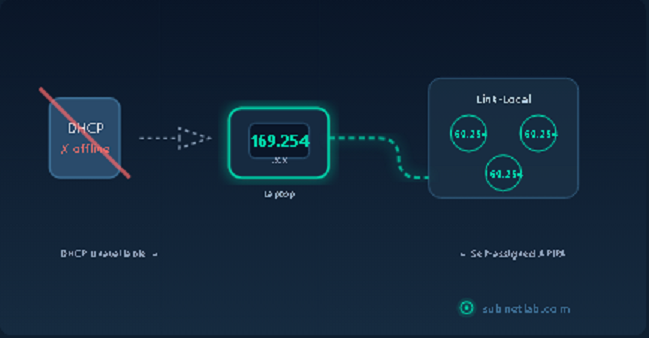
You plug in a laptop. The network icon shows a connection. Then nothing loads.
You open your IP settings and see something odd: an address starting with 169.254. This is not a mistake. It is APIPA, short for Automatic Private IP Addressing.
This guide explains what APIPA is, why your device gets one, and how to fix it fast. It also covers the security side that most articles skip.
What Is APIPA? Definition and Core Concept
APIPA is a fallback system built into most operating systems. It gives a device an IP address on its own, without help from a DHCP server.
Normally, a device asks a DHCP server for an address every time it joins a network. The server replies with an IP, a subnet mask, a gateway, and DNS details.
Sometimes that server never answers. Maybe it is down. Maybe the cable is loose. When this happens, the operating system does not give up. It assigns itself an address from a reserved range instead.
APIPA as a DHCP Failover Mechanism
APIPA works as a DHCP failover mechanism. It keeps a device functional on the local segment even when centralized addressing fails completely.
The IANA-Reserved 169.254.0.0/16 Range
That range is 169.254.0.0/16, and IANA has locked it aside specifically for this purpose. The subnet mask is always 255.255.0.0.
The 169.254.x.x Address Range: Technical Specifications

The full block is written in CIDR notation as 169.254.0.0/16. Two small pieces of this block are reserved and never handed out.
Usable APIPA Address Range and Host Count
The usable range runs from 169.254.1.0 to 169.254.254.255. That gives roughly 65,000 usable addresses for link-local assignment.
| Attribute | Value |
|---|---|
| Address block | 169.254.0.0/16 |
| Subnet mask | 255.255.0.0 |
| Usable range | 169.254.1.0 to 169.254.254.255 |
| Reserved subnets | 169.254.0.0/24 and 169.254.255.0/24 |
| Registry authority | IANA, under RFC 3927 |
| Routable on internet | No |
Reserved APIPA Subnets
The first and last /24 blocks inside the range stay reserved for special use and are never assigned to a regular device.
How APIPA Address Assignment Works: Step-by-Step Protocol Flow
The process follows a clear sequence, defined in RFC 3927, titled “Dynamic Configuration of IPv4 Link-Local Addresses.”
DHCP Discovery Timeout
The device sends a DHCP discovery request and waits. Most systems wait a short window before giving up on the server.
Once the timeout passes, the device picks a random address inside the 169.254.0.0/16 block.
Duplicate Address Detection (DAD) via ARP
Before using that address, the device runs a check called Duplicate Address Detection, or DAD.
It sends ARP probes onto the network asking if anyone else already owns that address.
If no one answers, the device claims the address and defends it. If another device replies, the process restarts with a new random pick.
Background DHCP Re-Probing
The device does not stop looking for a real DHCP server. It keeps probing in the background.
The moment a server responds, the device drops the APIPA address and takes the proper one instead.
APIPA vs DHCP vs Static IP: Key Differences
These three methods solve the same problem in very different ways.
The table below breaks down how they compare.
| Feature | APIPA | DHCP | Static IP |
|---|---|---|---|
| Configuration | Automatic, self-assigned | Automatic, server-assigned | Manual |
| Internet access | No | Yes | Yes |
| Gateway assigned | No | Yes | Manual entry |
| DNS assigned | No | Yes | Manual entry |
| Best use case | Emergency local fallback | Everyday networks | Servers, printers, fixed devices |
| Management effort | None | Low | High |
APIPA vs IPv6 Link-Local (fe80::/10): A Comparative Analysis
IPv6 handles this problem in a completely different way.
Every IPv6 interface generates a link-local address starting with fe80:: automatically, all the time.
There is no waiting period and no DHCP dependency.
EUI-64 vs Random Address Generation
The address forms right when the interface comes up, often using EUI-64 based on the MAC address.
APIPA, by contrast, always picks a random address inside its reserved block.
NDP vs ARP for Conflict Detection
Instead of ARP, IPv6 uses NDP, the Neighbor Discovery Protocol, to detect conflicts and find neighbors on the same segment.
| Aspect | APIPA (IPv4) | Link-Local (IPv6) |
|---|---|---|
| Address range | 169.254.0.0/16 | fe80::/10 |
| Trigger condition | DHCP failure only | Always active |
| Generation method | Random selection | EUI-64 or random |
| Conflict detection | ARP-based DAD | NDP-based DAD |
Why Do Devices Get APIPA Addresses? 6 Common Causes
Most APIPA cases trace back to one of these six situations.
DHCP Server Unavailability
The server is offline, overloaded, or crashed.
Physical Connectivity Issues
A loose cable, a dead port, or a faulty switch blocks the request entirely.
IP Address Conflicts
Another device on the segment already holds the address the server tried to hand out.
DHCP Scope Exhaustion
The server ran out of addresses to give, especially common on guest networks during busy hours.
Firewall Blocking DHCP Ports (UDP 67/68)
DHCP relies on UDP ports 67 and 68. A misconfigured firewall or VLAN rule can silently drop these packets.
Driver or Software Issues
An outdated network adapter driver sometimes fails to complete the DHCP handshake correctly.
How to Fix APIPA Address Issues: Step-by-Step Troubleshooting
Start by confirming the problem before changing anything.
Confirm the APIPA Address
On Windows, run ipconfig /all in Command Prompt. SOn Linux, run ip addr. On macOS, check Network settings or run ifconfig.
Renew the DHCP Lease
On Windows, run ipconfig /release followed by ipconfig /renew. On Linux, run dhclient -r followed by dhclient.
Check Physical Connections
If renewal fails, check the physical layer. Swap the cable, try a different port, or test with another device on the same line.
Verify the DHCP Server
Confirm the DHCP server itself is running and has free leases in its scope.
Capture Traffic with Wireshark
For deeper cases, capture traffic with Wireshark using a bootp filter. This shows whether DHCP requests are leaving the device and whether any reply ever comes back.
APIPA Security Risks and Mitigation Strategies
APIPA carries real security weight, even though most guides treat it as a purely cosmetic annoyance.
The Self-Assignment Vulnerability
Self-assigned addresses have no authentication step. Any device can claim one and start talking to others on the same segment. This opens the door to spoofing attacks, especially in flat network layouts where segmentation is weak.
Metadata Leakage Risks
Devices stuck on APIPA sometimes still broadcast hostname and service information over the local link, which can expose internal naming conventions to anyone listening.
Mitigation Strategies
Block the 169.254.0.0/16 range at the firewall where it has no business appearing. Apply network segmentation so a stuck device cannot freely reach sensitive systems. Monitor for unexpected 169.254.x.x traffic as an early warning sign of DHCP failure or tampering.
APIPA in the Zero-Configuration Networking (Zeroconf) Ecosystem
APIPA is only one piece of a larger idea called Zeroconf, or zero-configuration networking.
mDNS and LLMNR for Name Resolution
Zeroconf combines APIPA (sometimes called AutoIP) for addressing with mDNS, Multicast DNS, for name resolution without a central DNS server. On Microsoft networks, a related protocol called LLMNR plays a similar role for local name lookups.
DNS-SD for Service Discovery
Together with DNS-SD, DNS-based Service Discovery, these protocols let devices like printers and smart speakers find each other on a local network with zero manual setup.
APIPA in Virtualized and Cloud Environments

APIPA shows up in unexpected places inside data centers too.
VMware ESXi and vSAN Cluster Partitioning
In VMware ESXi, a vSAN cluster that loses network connectivity between hosts can fall back to link-local addressing, which sometimes triggers cluster partitioning if not caught quickly. In NSX environments, ARP snooping features track this range closely, since unexpected link-local traffic often signals a misconfigured segment.
Cloud Instance Metadata Service (169.254.169.254)
Cloud platforms use the same 169.254.x.x range on purpose for their instance metadata service. This is why cloud servers can query 169.254.169.254 to fetch their own configuration details.
APIPA in Embedded Systems and IoT Devices
Small embedded devices rely on stripped-down networking stacks like lwIP or NetX Auto IP to implement the same link-local logic. This lets headless devices, sensors, and IoT gadgets join a network and become reachable without any DHCP infrastructure at all. It is a major reason plug-and-play devices work straight out of the box on a home network.
APIPA vs Private IP Addresses (RFC 1918): What’s the Difference?

People often confuse APIPA with regular private IP addresses defined under RFC 1918.
| Feature | APIPA (169.254.0.0/16) | RFC 1918 Private Ranges |
|---|---|---|
| Ranges | 169.254.0.0/16 only | 10.0.0.0/8, 172.16.0.0/12, 192.168.0.0/16 |
| Assigned by | The device itself | DHCP server or manual setup |
| Routable within LAN | Local segment only | Fully routable across the LAN |
| Typical use | Emergency fallback | Normal daily networking |
FAQS
Can I manually assign an APIPA address?
Yes, technically you can type in a 169.254.x.x address by hand. It will not give internet access or reach other subnets, so it has no practical daily use.
Can APIPA devices communicate across subnets?
No. APIPA addresses only work between devices on the exact same physical or logical segment. They cannot cross a router.
How long before a device switches back to a normal DHCP address?
The device keeps probing for a DHCP server in the background the entire time. As soon as one responds, it switches immediately, usually within seconds.
Can APIPA be disabled?
Yes, on Windows this can be done through a registry setting called IPAutoconfigurationEnabled. Most home and business networks leave it enabled since it causes no harm.
Conclusion:
APIPA is not a bug. It is a standards-backed safety net, defined clearly in RFC 3927 and reserved formally by IANA.
It keeps local networking alive when DHCP fails, and it plays a supporting role across Zeroconf, cloud metadata services, and IoT provisioning.
Still, a 169.254.x.x address showing up on a production machine is always a signal worth investigating, not something to ignore.
For more networking guides, explore SubnetLab’s DHCP explained article, the IPv4 vs IPv6 guide, or the free subnet mask calculator.
Author Profile

-
Muhammad Kazim Ali – Owner & Principal Engineer at SubnetLab.com (real-world networking labs).
10+ years in routing, switching & infrastructure design. Helps students, pros & enterprises master networking via practical labs. Based in Lahore, works with ISPs, data centers & tech teams.
📞 +92 343 5201037 (WhatsApp) | ✉️ subnetlab.official@gmail.com | 🌐 subnetlab.com
Latest entries
 Network BlogAugust 25, 2026TCP/IP Model and Network Protocols Explained:TCP, UDP, ICMP, Handshakes, Flags, and Data Flow
 Network BlogAugust 11, 2026Router vs Calculator Showing Different Subnets? Why & the Fix
 Network BlogAugust 6, 2026Supernetting Explained: The Opposite of Subnetting
 Network BlogAugust 5, 2026Ping Command Explained:Your First Tool for Network Troubleshooting