
Every time you open a website, send a message, or start a video call, a small storm of protocols works behind the scenes to make it happen. Most people never see any of it. The page just loads, or it doesn’t.
I still remember the first time I actually understood why a page loads slowly even when my ping looks fine, or why a server answers a browser but ignores a ping. It clicked once I stopped memorizing definitions and started following the actual journey of data, from the moment an app hands off a request to the moment a frame leaves the network card. That journey is the TCP/IP model.
This guide walks through that journey in plain language. You will learn what the TCP/IP model is, how TCP, UDP, and ICMP each play their part, how a TCP connection opens and closes, what those SYN, ACK, FIN, and RST flags actually mean, and what happens step by step when you open a website or run a ping command. Along the way you will find comparison tables, real troubleshooting logic, and answers to the questions people actually search for.
What Is the TCP/IP Model?
The TCP/IP model is the practical framework that describes how data moves across a network, from the application you are using down to the physical wire or radio signal that carries the bits. It is the foundation of the modern internet. Every email, video stream, and web page relies on it.
Why Do We Need the TCP/IP Model?
Without a shared structure, devices from different manufacturers running different software would have no consistent way to talk to each other. The model solves that by breaking communication into layers, each with a clear job. One layer handles addressing, another handles reliable delivery, another handles the physical transmission of signals.
This layered approach also enables encapsulation. Each layer wraps the data from the layer above it with its own header, adding just enough information to do its job, without needing to understand everything the layer above was trying to accomplish.
That separation is what makes the internet interoperable. A router does not need to know anything about your email app. It just needs to read the IP header and forward the packet.
The Four Layers of the TCP/IP Model
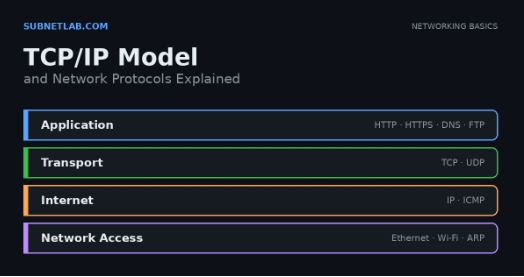
- Application layer – where your software lives: browsers, email clients, apps. Protocols here include HTTP, HTTPS, DNS, and FTP.
- Transport layer – responsible for getting data from one program to another, using TCP or UDP.
- Internet layer – responsible for addressing and routing across networks, using IP and ICMP.
- Network access (link) layer – responsible for the physical or wireless delivery of frames, using Ethernet, Wi-Fi, and ARP.
What Protocols Work at Each TCP/IP Layer?
| TCP/IP Layer | Common Protocols |
|---|---|
| Application | HTTP, HTTPS, DNS, DHCP, SSH, FTP |
| Transport | TCP, UDP |
| Internet | IP, ICMP |
| Network Access | Ethernet, Wi-Fi, ARP |
If you want to go deeper on addressing at the internet layer, our guides on IPv4 addressing and IPv6 addressing cover that in detail, and our subnetting and VLSM guides explain how those addresses get divided efficiently.
TCP/IP Model vs OSI Model
What Is the OSI Model?
The OSI model splits communication into seven layers: Physical, Data Link, Network, Transport, Session, Presentation, and Application. It was designed as a teaching and design reference rather than a strict implementation standard.
TCP/IP vs OSI: Layer by Layer
| OSI Layer | TCP/IP Layer |
|---|---|
| Application, Presentation, Session | Application |
| Transport | Transport |
| Network | Internet |
| Data Link, Physical | Network Access |
Key Differences Between OSI and TCP/IP
OSI has seven layers built mainly for conceptual clarity, while TCP/IP has four layers built around how the internet actually works. TCP/IP is protocol dependent, meaning it was designed around TCP and IP specifically, while OSI is protocol independent and more theoretical.
In practice, engineers use OSI language when discussing concepts like “layer 2 switching” or “layer 7 firewall,” even though the actual traffic follows the TCP/IP model.
Is TCP/IP Better Than OSI?
Neither model is objectively better. OSI is excellent for teaching and troubleshooting vocabulary, since it breaks concepts into finer detail. TCP/IP is what actually runs the internet. Most network professionals end up thinking in a hybrid of both.
What Is TCP?
TCP stands for Transmission Control Protocol. It is the workhorse behind almost every reliable connection on the internet, from web browsing to file transfers.
How TCP Works
Application data gets broken into TCP segments. Each segment gets wrapped in an IP packet, and each packet gets wrapped in an Ethernet or Wi-Fi frame before it actually leaves your device. The receiving device reverses this process, stripping away each header until the original application data is rebuilt.
Main Characteristics of TCP
TCP is connection oriented, meaning both sides agree to talk before any real data moves. It guarantees reliable, ordered delivery, detects errors, retransmits lost data, and manages both flow control and congestion control. It also supports full duplex communication, so both sides can send and receive at the same time.
Where Is TCP Used?
TCP powers HTTPS, HTTP, SSH, FTP, SMTP, and IMAP. Anywhere accuracy matters more than raw speed, TCP is usually the protocol doing the work. If you want to see which ports these services typically use, our TCP and UDP ports guide breaks that down clearly.
What Is UDP?
How UDP Works
UDP sends data as independent datagrams without setting up a connection first. There is no handshake, no acknowledgment requirement, and no built in retry mechanism. It simply sends and moves on.
Characteristics of UDP
UDP is connectionless and lightweight. It does not guarantee delivery, does not guarantee order, and does not retransmit lost data on its own. That sounds risky, but for the right use case it is exactly what you want.
Where Is UDP Used?
DNS lookups, DHCP requests, VoIP calls, online gaming, live streaming, and QUIC, the protocol behind HTTP/3, all rely on UDP because speed and low latency matter more than perfect delivery.
When Should You Use TCP vs UDP?
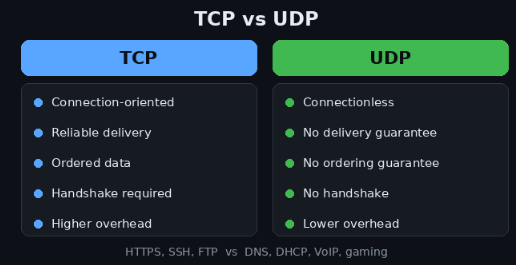
Choose TCP when correctness matters, like loading a webpage or transferring a file where a missing byte breaks everything. Choose UDP when speed matters more than perfection, like a live voice call where a tiny dropped packet is far less disruptive than a delay.
TCP vs UDP: What Is the Difference?
| Feature | TCP | UDP |
|---|---|---|
| Connection | Connection-oriented | Connectionless |
| Reliability | Guaranteed | Not guarantee |
| Ordering | Guaranteed | Not guarantee |
| Retransmission | Yes | No |
| Handshake | Yes | No |
| Flow control | Yes | No |
| Congestion control | Yes | No |
| Overhead | Higher | Lower |
| Data unit | Segment | Datagram |
| Typical uses | HTTPS, SSH, FTP | DNS, DHCP, VoIP, gaming |
Which Is Faster: TCP or UDP?
UDP has less overhead, so it often feels faster in raw throughput tests. But calling UDP “always faster” ignores real world conditions. On a clean, low latency network, TCP can perform almost as well, and its reliability prevents costly retransmissions at the application level.
Can UDP Be Reliable?
Yes, if the application builds reliability on top of it. QUIC, which powers HTTP/3, does exactly that. It runs over UDP but adds its own mechanisms for ordering, loss recovery, and encryption, combining UDP’s speed with TCP-like reliability.
TCP Three Way Handshake Explained
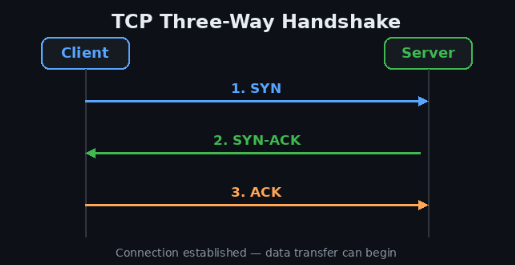
TCP needs a handshake because both sides must agree on starting sequence numbers and confirm that each side can actually hear the other before real data starts flowing.
Steps
1,-SYN: The client sends a SYN packet with its initial sequence number, signaling it wants to start a connection.
2-SYN-ACK: The server responds with its own SYN and an ACK that acknowledges the client’s sequence number.
3- ACK: The client acknowledges the server’s sequence number. The connection is now established, and data transmission can begin.
Example flow:
Client → SYN → Server
Client ← SYN-ACK ← Server
Client → ACK → Server
What Happens If a SYN Packet Is Lost?
If the SYN or SYN-ACK gets lost, the sending side waits for a timeout and then retransmits. This retry happens a limited number of times before the connection attempt fails, which is exactly why a bad network can make a website feel like it is hanging before it finally times out.
TCP Flags Explained
TCP flags are small control bits inside the TCP header that tell each side what kind of message this segment represents.
The SYN flag starts a connection. The ACK flag confirms that data or a control message was received. The FIN flag requests a graceful shutdown of the connection. The RST flag forces an immediate, abrupt reset, usually because something went wrong.
The PSH flag tells the receiving system to push buffered data straight to the application instead of waiting for more. The URG flag marks urgent data using an urgent pointer, though it is rarely used in modern applications.
The ECE and CWR flags work together to support Explicit Congestion Notification, letting routers signal congestion without dropping packets. The NS flag is a rarely used bit tied to ECN nonce protection, mostly of historical interest today.
SYN vs ACK vs FIN vs RST
| Flag | Main Purpose |
|---|---|
| SYN | Establish or synchronize a TCP connection |
| ACK | Acknowledge received data or control information |
| FIN | Gracefully close a TCP connection |
| RST | Immediately reset a connection |
During connection setup, SYN and ACK work together in the three way handshake. During a normal shutdown, FIN and ACK pass back and forth from both sides. When something breaks, whether it is a closed port, a firewall block, or a crashed application, RST shows up instead, ending the conversation immediately without the polite goodbye that FIN provides.
TCP Connection Termination Explained
TCP typically closes using a four way termination. The side that wants to close sends a FIN, the other side responds with an ACK, and then that side sends its own FIN, which gets acknowledged in return.
FIN → ACK → FIN → ACK
If the server closes first, it sends the FIN while the client is still receiving, and the roles simply reverse for the second half of the handshake.
What Is the TCP TIME_WAIT State?
After closing, the side that sent the last ACK enters a state called TIME_WAIT for a short period. This exists to make sure any delayed or duplicate packets from the old connection do not get confused with a future connection using the same port pair.
It is normal, and it is why you sometimes see connections listed as TIME_WAIT in tools like netstat even after an application has closed.
FIN vs RST
FIN means a graceful, polite closure where both sides agree the conversation is over. RST means an abrupt, one sided termination, usually triggered by an error, a blocked port, or an application that crashed mid conversation.
TCP Retransmission Explained
TCP retransmission happens when data does not reach its destination correctly. This can occur because a packet is lost, an acknowledgment does not arrive, or network congestion causes packets to be dropped along the way.
TCP Retransmission Timeout
TCP monitors the time needed for data to travel to the destination and for the acknowledgment to return. Based on this timing, TCP calculates a Retransmission Timeout (RTO). If the expected acknowledgment does not arrive before the RTO expires, TCP assumes that the data may have been lost and sends it again.
Duplicate ACKs and Fast Retransmit
Rather than always waiting for a full timeout, TCP can react faster. If the receiver keeps acknowledging the same sequence number multiple times, that is a strong signal that a specific segment went missing.
TCP treats three duplicate ACKs as a trigger to resend that segment immediately, a mechanism known as fast retransmit.
TCP Retransmission vs UDP
UDP has no equivalent mechanism. If a UDP datagram is lost, it is simply gone unless the application itself notices and asks for the data again.
TCP Flow Control Explained
Flow control exists to protect the receiver, not the network. It is a completely separate concept from congestion control, and mixing the two up is one of the most common mistakes people make when learning TCP.
Receiver Window
The receiving side advertises how much data it can currently accept, using a value called the “receive window,” often shortened to “rwnd.” The sender is not allowed to send more than that amount before waiting for acknowledgment.
TCP Sliding Window
As acknowledgments come in, the window slides forward, allowing new data to be sent while older data is confirmed. This keeps the connection efficient without overwhelming either side.
What Happens When the Receiver Is Slow?
If the receiving application is slow to read data, its buffer fills up, the advertised window shrinks, and the sender is forced to slow down, even if the network itself has plenty of capacity.
TCP Window Size Explained
What Is the TCP Receive Window?
The receive window tells the sender exactly how many bytes it can transmit before needing an acknowledgment. It directly controls how much data can be “in flight” at once.
TCP Window Scaling
The original TCP window field is limited to 65,535 bytes, which becomes a real bottleneck on high bandwidth, high latency connections. Window scaling, defined as a TCP option, allows both sides to negotiate a much larger effective window, which is essential for fast modern connections like fiber and long distance links.
TCP Window Size vs TCP Segment Size
Window size describes how much data can be outstanding at once. Segment size describes how large each individual chunk of that data is. A large window filled with tiny segments still moves data, just less efficiently than a large window filled with well sized segments.
TCP Window Size vs MTU
MTU is the maximum size a single frame can be at the network access layer. Window size operates at the transport layer and can span many packets. They are related but solve different problems.
How Window Size Affects Network Performance
A window that is too small forces constant waiting for acknowledgments, wasting available bandwidth on high latency links. A properly scaled window keeps the pipe full and dramatically improves throughput.
TCP Congestion Control Explained
Congestion control protects the network itself, not just the receiver.
Flow Control vs Congestion Control
| Feature | Flow Control | Congestion Control |
|---|---|---|
| Protects | Receiver | Network |
| Main problem | Receiver cannot process data fast enough | Network is overloaded |
| Main mechanism | Receive window | Congestion window |
| Related concept | rwnd | cwnd |
TCP Slow Start, Congestion Avoidance, Fast Retransmit, and Fast Recovery
TCP begins new connections cautiously, using slow start to gradually ramp up how much data it sends. Once it approaches the estimated capacity of the path, it shifts into congestion avoidance, growing more conservatively.
When packet loss is detected through duplicate ACKs, fast retransmit resends the missing segment immediately, and fast recovery lets the connection keep some momentum instead of falling all the way back to slow start. All of this exists because sending too aggressively causes routers to drop packets, which only makes congestion worse.
What Is the UDP Header?
UDP Header Structure
The UDP header is deliberately minimal, containing only four fields: source port, destination port, length, and checksum.
UDP Header vs TCP Header
TCP’s header carries sequence numbers, acknowledgment numbers, window size, and flags, which is why it is much larger and heavier than UDP’s compact header. That extra weight is the price TCP pays for reliability.
Why Does UDP Have Lower Overhead?
Because it skips connection setup, acknowledgment tracking, and retransmission logic entirely, UDP spends far fewer bytes and far less processing time per packet, which is exactly why real-time applications favor it.
What Is ICMP?
What Does ICMP Do?
ICMP handles diagnostics and error reporting at the network layer. It is how devices tell each other that something went wrong, like an unreachable destination or an expired packet.
Common ICMP Message Types
Echo Request and Echo Reply power the ping command. Destination Unreachable tells a sender that a packet could not be delivered. Time Exceeded appears when a packet’s TTL runs out, which is exactly how traceroute works. Redirect messages tell a device to use a better route.
ICMPv4 vs ICMPv6
ICMPv6 expands on ICMPv4’s role significantly, handling tasks that IPv4 relied on separate protocols for, including neighbor discovery, which replaces much of what ARP does in IPv4 networks. If you work with modern networks, our IPv6 guide covers this relationship in more depth.
Is ICMP a Transport Protocol?
No, and this trips up a lot of beginners. ICMP is not TCP or UDP, and it does not use port numbers at all. It operates directly at the internet layer, which is exactly why firewall rules based purely on TCP or UDP ports will not control ICMP traffic.
ICMP vs TCP vs UDP
| Feature | TCP | UDP | ICMP |
|---|---|---|---|
| Purpose | Reliable transport | Lightweight transport | Control and diagnostics |
| Layer | Transport | Transport | Internet |
| Port numbers | Yes | Yes | No |
| Connection | Yes | No | No |
| Common example | HTTPS | DNS | Ping |
Why Ping Uses ICMP Instead of TCP
Ping is designed purely to test reachability and round trip time, not to carry application data, so it makes sense for it to use a lightweight diagnostic protocol instead of a full transport protocol like TCP.
Can You Ping a Server but Still Have No Internet?
Yes. A successful ping only confirms that ICMP traffic is reaching a specific host. Your DNS resolution, routing to other destinations, or the application itself could all still be broken, which is a classic troubleshooting trap.
What Happens When You Open a Website?
This is where everything above comes together in real life.
Steps
DNS resolution: Your browser needs the website’s IP address, so it queries a DNS server. Our DNS guide walks through this lookup process in detail.
establishing connectivity: Your device checks its default gateway, uses ARP or NDP to find the right hardware address, and the network routes the request toward the destination.
TCP connection: For HTTPS sites, your browser completes the TCP three way handshake, SYN, SYN-ACK, ACK, with the server.
TLS handshake: Browser and server negotiate encryption keys so the session can be secured.
HTTP request: The browser sends its actual request for the page content.
6, server response: The server returns the requested data.
7-TCP segmentation and acknowledgment:
The response gets broken into segments, tracked with sequence numbers, acknowledged, and retransmitted if anything goes missing.
8, rendering: The browser assembles everything and displays the finished page.
The whole flow, simplified, looks like this: DNS → ARP/NDP → IP → TCP → TLS → HTTP/HTTPS → Ethernet/Wi-Fi. It happens in a fraction of a second, but every layer of the TCP/IP model plays a role in getting it there.
What Happens When You Ping a Server?
The ping command sends an ICMP Echo Request to a target and waits for an ICMP Echo Reply. The time between sending and receiving is the round trip time, which is what ping reports back to you.
Packet loss means some of your requests never got a reply. “Request time out” means no response arrived within the expected time window. “Destination host unreachable” usually means a router along the path has no valid route to the target and is telling you so directly.
Ping can fail even when a website works perfectly fine, because many servers and firewalls deliberately block ICMP traffic for security reasons while still allowing HTTPS traffic through on TCP port 443. I have seen this confuse plenty of people troubleshooting a “down” service that was actually working the whole time, just silently ignoring ping.
Common TCP/IP and Network Protocol Mistakes
A few misconceptions come up again and again. TCP is not always slower than UDP, it depends on the network conditions and use case. UDP is not automatically unreliable, applications can build their own reliability on top of it. ICMP does not use port 7 or any port at all, since it does not operate at the transport layer. Ping does not use TCP, it uses ICMP.
TCP and IP are not the same protocol, TCP handles reliable delivery while IP handles addressing and routing. TCP does not guarantee zero packet loss, it guarantees that lost data gets detected and retransmitted. Flow control and congestion control are not the same mechanism, one protects the receiver and the other protects the network.
SYN does not mean “send data,” it means “synchronize and start a connection.” An ACK does not always confirm that application data arrived, sometimes it only confirms a control message. Not every website uses only TCP, since HTTP/3 and QUIC run over UDP. And UDP absolutely can be used for reliable applications when the application layer adds that reliability itself.
TCP/IP Troubleshooting: Which Protocol Should You Check?
After DNS is working properly, check the IP routing, firewall rules, and the required TCP or UDP port if the connection still fails.
When a TCP connection repeatedly resets, look for RST packets and check whether the firewall, application, or server is causing the problem.
For high latency or packet loss, examine ICMP responses, the routing path, and possible network congestion between the source and destination.
Even if a website works while ping fails, do not assume the website has a network problem because many firewalls block ICMP while allowing TCP-based services such as HTTPS to work normally.
For a more detailed troubleshooting process, see our network troubleshooting guide.
Frequently Asked Questions
What is the TCP/IP model?
It is the four layer framework, application, transport, internet, and network access, that describes how data actually travels across the internet.
What are the four layers of TCP/IP?
Application, transport, internet, and network access.
What is the difference between TCP and UDP?
TCP is connection oriented and reliable, while UDP is connectionless and prioritizes speed over guaranteed delivery.
What is a TCP three way handshake?
The SYN, SYN-ACK, ACK exchange that establishes a TCP connection before any application data is sent.
What are SYN, ACK, FIN, and RST?
TCP flags that respectively start a connection, acknowledge data, gracefully close a connection, and immediately reset one.
What is TCP retransmission?
The process of resending data that was lost or never acknowledged, triggered by a timeout or duplicate acknowledgments.
What is TCP flow control?
A mechanism that prevents a sender from overwhelming a receiver, based on the receiver’s advertised window size.
What is TCP congestion control?
A mechanism that prevents a sender from overwhelming the network itself, adjusting the sending rate based on detected congestion.
What is TCP window size?
The amount of data that can be sent before requiring an acknowledgment, directly affecting throughput on a connection.
What is a UDP header?
A compact header containing only the source port, destination port, length, and checksum.
What is ICMP?
A network layer protocol used for diagnostics and error reporting, most commonly seen in ping and traceroute.
Does ICMP use port numbers?
No. ICMP operates at the internet layer and does not use TCP or UDP port numbers.
Does ping use TCP or UDP?
Neither. Ping uses ICMP Echo Request and Echo Reply messages.
What happens when you open a website?
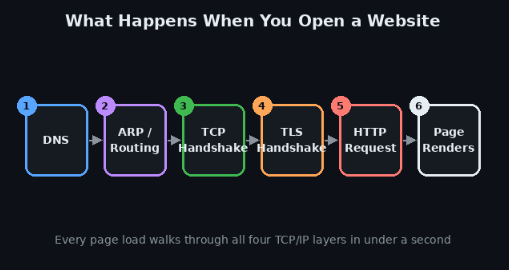
Your browser resolves DNS, establishes a TCP connection, completes a TLS handshake for HTTPS, sends an HTTP request, and renders the response it receives.
What happens when you ping a server?
Your device sends an ICMP Echo Request and measures the time until it receives an Echo Reply, reporting that as round trip time.
Final Summary
The TCP/IP model ties everything together. Layers organize responsibility, protocols carry out specific jobs within those layers, TCP and UDP move data between applications, ports direct that data to the right service, and IP and ICMP handle addressing, routing, and diagnostics.
Handshakes establish trust before data flows, reliability mechanisms like retransmission and flow control keep that data intact, and congestion control keeps the wider network from collapsing under load.
Understanding how these pieces connect is what turns memorized definitions into real, usable troubleshooting skills, whether you are debugging a stalled connection or just curious what actually happens the moment you hit enter on a web address.
For more foundational networking concepts, see our guides on MAC addresses, Ethernet, ARP, default gateways, and DHCP. For the official technical definitions behind TCP and UDP, the IETF’s RFC 9293 for TCP and Cloudflare’s networking learning center are excellent authoritative references.
Author Profile

-
Muhammad Kazim Ali – Owner & Principal Engineer at SubnetLab.com (real-world networking labs).
10+ years in routing, switching & infrastructure design. Helps students, pros & enterprises master networking via practical labs. Based in Lahore, works with ISPs, data centers & tech teams.
📞 +92 343 5201037 (WhatsApp) | ✉️ subnetlab.official@gmail.com | 🌐 subnetlab.com
Latest entries
 Network BlogAugust 25, 2026TCP/IP Model and Network Protocols Explained:TCP, UDP, ICMP, Handshakes, Flags, and Data Flow
 Network BlogAugust 11, 2026Router vs Calculator Showing Different Subnets? Why & the Fix
 Network BlogAugust 6, 2026Supernetting Explained: The Opposite of Subnetting
 Network BlogAugust 5, 2026Ping Command Explained:Your First Tool for Network Troubleshooting