
The internet is moving quickly towards IPv6. Network engineers, developers, IT students, and hosting providers all need reliable ways to test and verify IPv6 addresses.
The SubnetLab IPv6 Address Validator helps with this. You can use it to validate the address format, detect invalid syntax, identify the type of IPv6 address you are
working with, and check that it follows the rules in RFC 5952.
It can be used to check the address format, find invalid syntax, determine the IPv6 address type you are working with, or verify that it is in accordance with RFC 5952 rules.
In this guide, I’ll walk you through:
What an IPv6 address validator actually does
In this guide, you’ll learn:
• What an IPv6 address validator is
• How the tool works
• How to validate IPv6 addresses online
• IPv6 compression and expansion concepts
• Common IPv6 address types
• Why RFC 5952 formatting matters
• FAQs and practical examples
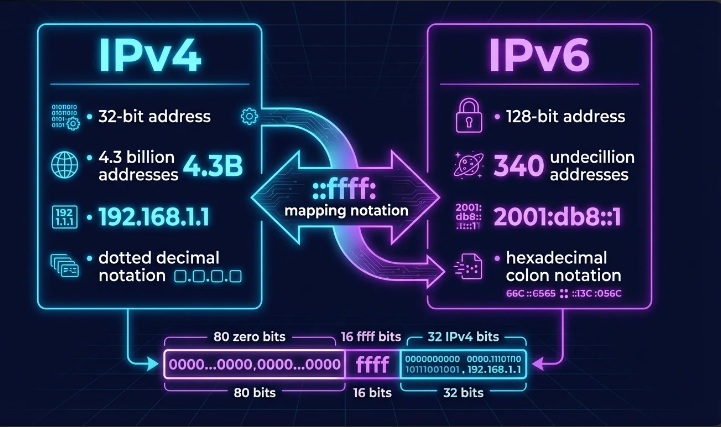
What Is an IPv6 Address Validator?
An IPv6 address validator is a network tool that determines whether or not an IPv6 address is properly formatted and technically valid according to IPv6 standards.
The validator can detect:
• Invalid characters
• Incorrect colon placement
• Wrong hexadecimal formatting
• Invalid compressed addresses
• Unsupported IPv6 syntax
• Mixed IPv4/IPv6 formatting issues
Modern IPv6 tools also identify special address categories, such as the following:
• IPv6 loopback address
• Link-local addresses
• Unique local addresses
• IPv4-mapped IPv6 addresses
• Multicast IPv6 addresses
Instead of manually checking long hexadecimal strings, the validator automatically analyzes the address and shows detailed results instantly.
Why IPv6 Validation Is Important
IPv6 addresses are long as compared to IPv4 addresses, which are short. So please avoid mistakes, especially when you are using IPv6 address allocation, because it can break connectivity, firewall rules, routing configurations, or DNS records.
Using an IPv6 syntax checker helps avoid the following:
• Network configuration errors
• Routing failures
• Invalid DNS AAAA records
• Server deployment mistakes
• Security policy mismatches
For example, this is a valid IPv6 address:
2001:db8::1
But these are invalid:
2001:::db8::1
GGGG::1234
Even experienced network engineers sometimes mistype compressed IPv6 notation. A validator catches these mistakes immediately.
How to Use the IPv6 Address Validator Tool
Using the tool is very simple.
Step 1: Enter an IPv6 address.
Type or paste your IPv6 address into the input field.
Example:
::ffff:192.168.1.1
It’s called an IPv4-mapped IPv6 address.
Step 2: Click “Validate.”
Press the Validate button.
The tool instantly checks:
• IPv6 syntax validity
• Compression rules
• Canonical formatting
• Address category
• Hexadecimal correctness
• Expansion format
Step 3: Review the Results
The validator displays detailed information such as:
• Validation status
• Canonical compressed form
• Fully expanded form
• Address type
• Hexet count
• Bit length
• Original input
From your screenshot example:
• Status: Valid
• Type: IPv4-mapped IPv6
• Expanded Form:
0000:0000:0000:0000:0000:ffff:c0a8:0101
• Canonical Form:
::ffff:c0a8:101
Learn IPv6 Address Compression
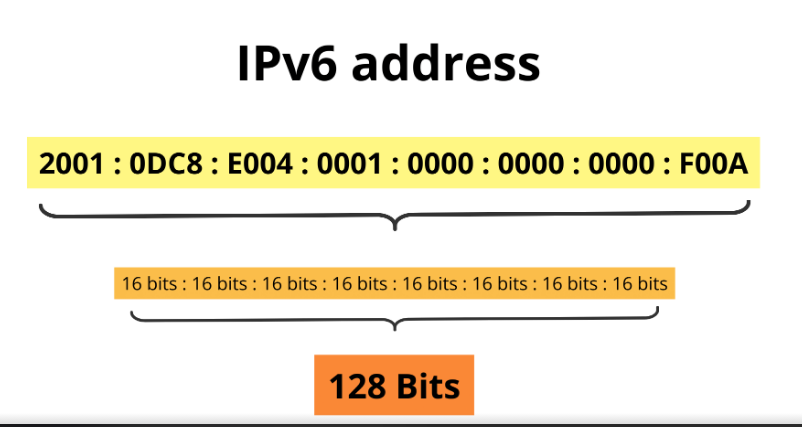
IPv6 addresses consist of 128 bits and are written using hexadecimal values.
A full representation IPv6 address looks like this:
2001:0db8:0000:0000:0000:ff00:0042:8329
Because writing long addresses constantly is difficult, IPv6 allows address compression.
Compressed version:
2001:db8::ff00:42:8329
Compression Rules
IPv6 compression follows standard rules:
• Leading zeros can be removed.
• Consecutive zero blocks can become:
• A double colon can only appear once.
A good IPv6 address compression tool automatically converts long addresses into a solid canonical form.
What Is IPv6 Canonical Form?
The IPv6 canonical form is the regular representation of an IPv6 address defined by RFC 5952.
Canonical formatting ensures consistency across:
• Routers
• Servers
• DNS systems
• APIs
• Security logs
RFC 5952 Compliance Rules
RFC 5952 recommends:
• Use lowercase letters
• Remove leading zeros
• Compress the longest zero sequence
• Avoid unnecessary formatting
Example:
As an alternative to:
2001:0DB8:0000:0000:0000:0000:0000:0001
Use:
2001:db8::1
The SubnetLab validator automatically checks RFC 5952 compliance.
Common IPv6 Address Types Detected by the Tool
One useful feature of this IPv6 address type checker is automatic address classification.
1. Loopback Address
Used by the local machine to communicate with itself.
::1
This is similar to 127.0.0.1 in IPv4.
The tool supports IPv6 loopback test validation.
2. Link-Local Address
These addresses work only within a local network segment.
Example:
fe80::1
They usually start with:
fe80::
The validator identifies IPv6 link-local addresses instantly.
3. Unique Local Address (ULA)
Used inside private networks.
Example:
fd12:3456:789a::1
These are similar to private IPv4 ranges like 192.168.x.x.
4. Multicast Address
Multicast IPv6 addresses start with:
ff00::
These addresses send packets to multiple devices simultaneously.
The tool includes IPv6 multicast detection support.
5. IPv4-Mapped IPv6 Address
These addresses represent IPv4 systems inside IPv6 environments.
Example:
::ffff:192.168.1.1
Your screenshot demonstrates this format perfectly.
IPv6 Address Expansion Explained
IPv6 expansion restores compressed addresses into full notation.
Compressed:
2001:db8::1
Expanded:
2001:0db8:0000:0000:0000:0000:0000:0001
This is useful for:
• Network troubleshooting
• Packet analysis
• Firewall configurations
• Documentation
The SubnetLab validator performs automatic IPv6 address expansion very quickly.
Common Mistakes When Writing IPv6 Addresses
- Using ::twice.2001:db8::1::2 is invalid because the address becomes ambiguous.
- Forgetting leading zeros in a group. Each group can have up to four hex digits
- so 2001:db8:0:0:0:0:0:1 but 2001:db8:0000:1 is not .
- Mixing up /64 and /128.A/64 is a subnet,and a /128 is one host.
- Using uppercase in documentation. RFC 5952 recommends lowercase, so stick to it for consistency.
- Writing a DNS AAAA record with an IPv4 address. AAAA records need IPv6 addresses only.
Benefits of Using the IPv6 Validator
Fast Validation
Get instant results without manual calculations.
Accurate Formatting
Checks canonical formatting and IPv6 syntax correctness.
Multiple Address Type Detection
Identifies:
• Multicast
• Loopback
• Link-local
• Unique local
• IPv4-mapped IPv6
Beginner-Friendly
Simple interface designed for students and professionals alike.
Works Online
No installation required. You can validate IPv6 addresses online from any browser.
Best Practices for IPv6 Address Validation
To avoid networking issues:
• Always use canonical IPv6 formatting
• Double-check compressed addresses
• Validate AAAA DNS records before deployment
• Test firewall and routing entries carefully
• Avoid uppercase hexadecimal notation
• Follow RFC 5952 recommendations
Using a reliable IPv6 network tool helps significantly reduce configuration errors.
Internal Linking Opportunities
You can internally link this article with related networking tools such as:
• IPv6 Subnet Calculator
• IPv4 to IPv6 Converter
• IP Range to CIDR Converter
• Subnet Mask Calculator
• Traceroute Tool
• DNS Lookup Tool
This improves topical authority and semantic SEO coverage.
Frequently Asked Questions
What is the purpose of an IPv6 address validator?
An IPv6 validator checks whether an IPv6 address is correctly formatted and identifies its address type.
What is RFC 5952?
RFC 5952 defines the standard canonical format for writing IPv6 addresses consistently.
Can the tool detect invalid IPv6 syntax?
Yes. The validator checks formatting rules, hexadecimal values, compression errors, and invalid colon placement.
What is an IPv4-mapped IPv6 address?
It is a special IPv6 format used to represent IPv4 systems inside IPv6 networks.
Example:
::ffff:192.168.1.1
What is the difference between the compressed and expanded IPv6 formats?
The compressed format shortens IPv6 addresses by removing zeros, while the expanded format shows all hexadecimal blocks fully.
Final Thoughts
IPv6 networking can appear complicated because of long hexadecimal addresses and compression rules. A reliable IPv6 address validator removes that complexity and helps ensure every address is correctly formatted and standards-compliant.
The SubnetLab IPv6 Address Validator makes it easy to:
• Validate IPv6 syntax
• Detect address types
• Expand compressed addresses
• Verify canonical formatting
• Check RFC 5952 compliance
Whether you are a student learning networking, a system administrator configuring servers, or a developer working with IPv6 APIs, this tool saves time and reduces errors.