
A port number is a 16-bit identifier (0–65535) that sits at the Transport Layer of the OSI model, working alongside an IP address to tell a device exactly which service or application should receive incoming data. If an IP address is the street address of a building, the port number is the specific apartment or office suite inside it.
The building (the host) might run dozens of services simultaneously: a web server, a mail server, and a database, and the port is what keeps that traffic from getting jumbled together.
Port numbers fall into three official ranges defined by the Internet Assigned Numbers Authority (IANA):
- Well-known ports (0–1023): Reserved for core, long-established services like HTTP, FTP, and SSH. On Linux and Unix systems, binding to one of these requires root/superuser privileges.
- Registered ports (1024–49151): Assigned to specific applications by request, think MySQL, RDP, or proprietary software services.
- Dynamic/private ports (49152–65535): Also called ephemeral ports. These are temporarily assigned by your operating system as the source port for an outgoing connection and released once the session ends.
One distinction that trips up a lot of people studying for CCNA: a port number alone means nothing without its transport protocol — TCP or UDP. Port 53 over TCP and port 53 over UDP are technically two separate “addresses” that share the same number, and they behave very differently in practice.
TCP vs. UDP: Why It Changes How You Troubleshoot
TCP (Transmission Control Protocol) is connection-oriented. Before any data moves, TCP performs a three-way handshake (SYN, SYN-ACK, ACK), and it guarantees that packets arrive in order, retransmitting anything lost along the way. This reliability comes at the cost of speed and overhead — which is exactly why it’s used for things like web browsing, email, and file transfers, where data integrity matters more than raw speed.
UDP (User Datagram Protocol) is connectionless. There’s no handshake, no guaranteed delivery, no built-in ordering. It just fires packets and moves on. That sounds risky, but it’s precisely what makes UDP the right choice for DNS lookups, VoIP calls, and video streaming—applications where a dropped packet is less damaging than the lag caused by waiting for retransmission.
Here’s the practical implication most beginner guides leave out: when you’re troubleshooting a “port is down” complaint, the very first thing to check is whether you’re dealing with a TCP service or a UDP service, because the diagnostic tools and symptoms differ completely. A blocked TCP port usually produces a clear “connection refused” or timeout. A blocked UDP port often produces silence no error at all — which is exactly the kind of failure that sends engineers chasing the wrong problem for hours.
The Core List: Common Port Numbers Every Network Engineer Should Know
I’ve grouped these by function rather than dumping them in numerical order, because that’s how you’ll actually encounter them in real troubleshooting — by symptom, not by sequence.
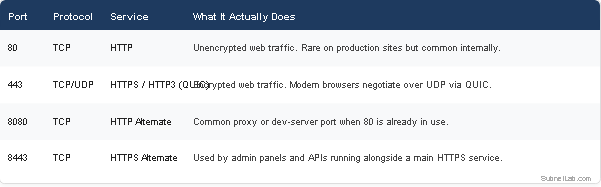
Web and Application Traffic
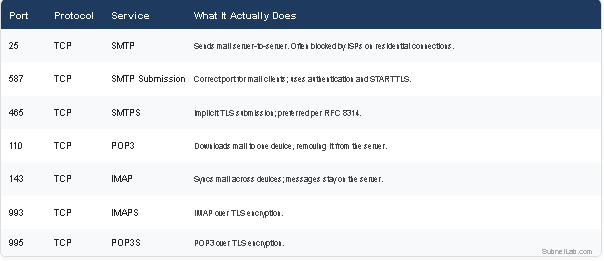
Email Protocols (The Ones Everyone Mixes Up)
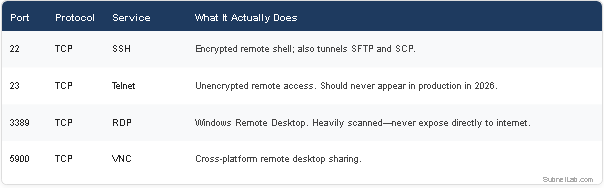
Remote Access and Management
File Transfer
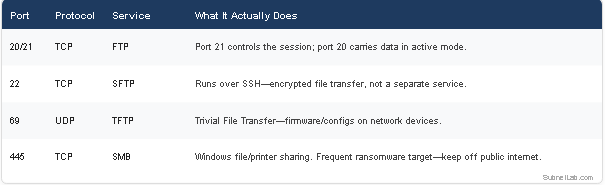
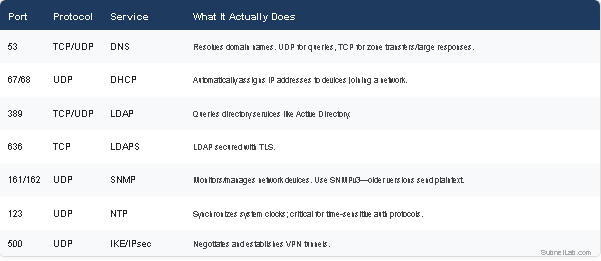
Directory, Authentication, and Network Management
Databases
Almost every port-numbers article online is frozen in roughly 2015. Here’s what’s actually relevant to network engineers working today, in 2026:
- Port 853 (DNS-over-TLS / DoT): As privacy-focused DNS resolution becomes standard, more enterprise networks are seeing encrypted DNS traffic on port 853 instead of plain port 53. If your firewall logging only watches port 53, you’re missing a growing share of DNS activity on your network.
- Port 443 over UDP (QUIC/HTTP3): This is the single biggest shift in modern web traffic. Many engineers still assume port 443 means TCP. Increasingly, it doesn’t. Chrome, Firefox, and most CDNs negotiate HTTP/3 over UDP using the QUIC protocol on the same port number. This matters for firewall rules and traffic shaping, because a UDP-only inspection gap on 443 can let traffic bypass deep packet inspection that was written assuming TCP.
- Port 51820 (WireGuard VPN): WireGuard has become the default modern VPN protocol for a huge share of new deployments, replacing older IPsec and OpenVPN setups in many environments. It’s UDP-based and worth knowing on sight.
- Port 6443 (Kubernetes API server): With container orchestration now standard in most infrastructure teams, this port shows up constantly in cloud-native environments and is rarely covered in traditional CCNA-style port lists.
A Memorization Framework That Actually Works
Most students try to brute-force memorize a flat list, which is exactly why the knowledge doesn’t stick. Group ports by what they have in common instead:
- Group by function, not number. Learn all the email ports together (25, 587, 465, 110, 143, 993, 995) as one mental cluster rather than scattered facts.
- Learn the “secure pair” pattern. Many services have an insecure original and a TLS-secured successor: 80→443, 21→990, 23→22, 110→995, 143→993. Once you spot this pattern, half the list memorizes itself.
- Anchor with real traffic. Run a packet capture or scan your own home network with a port scanner tool and watch which ports are actually active. Seeing port 443 traffic flood your own screen does more for retention than any flashcard.
- Tie it to a failure story. Engineers who’ve had a port-related outage never forget that port number again. If you haven’t experienced one yet, study the public post-mortems of major breaches tied to specific ports (port 445 )and the WannaCry outbreak are classic teaching examples).
How to Check Open Ports Yourself
Reading a list is one thing; verifying it against a live system is what actually builds the skill. A few practical approaches:
- From the command line: Use netstat-tuln (Linux) or Get-NetTCPConnection.
- Get-NetTCPConnection (PowerShell) to see which ports are actively listening on a host.
- Across a network: Tools like Nmap let you scan a range of IPs and ports to map out what’s actually exposed.
- Quick browser-based check: If you want a fast, no-install way to test whether a specific port is open on a host, SubnetLab’s free Port Scanner tool lets you check common ports instantly without touching a terminal, useful for quick sanity checks during troubleshooting or for students confirming lab results.
- Pair it with DNS troubleshooting: Since so many “port” issues are actually DNS issues in disguise (as in my 2 a.m. story above), it’s worth running a check through the DNS Lookup tool alongside any port test—if DNS isn’t resolving, no open port will save you.
Common Mistakes Engineers Make With Port Numbers
- Assuming a closed port and a filtered port are the same thing. A closed port actively refuses connections; a filtered port silently drops them. They require completely different troubleshooting paths.
- Forgetting that ephemeral source ports matter too. When troubleshooting outbound connections, engineers often fixate on the destination port and forget the firewall rule also needs to permit the dynamically assigned source port range for the return traffic.
- Leaving database ports internet-facing “temporarily.” Ports 3306, 5432, 27017, and 6379 should essentially never be reachable from the public internet. Most large-scale data breaches involving databases trace back to exactly this mistake.
- Treating port number changes as real security. Moving SSH from port 22 to port 2222 reduces noise from automated bots, but it is not a substitute for proper authentication and firewall rules. It’s a minor speed bump, not a wall.
Frequently Asked Questions
What is the difference between a well-known port and a registered port?
Well-known ports (0–1023) are reserved for foundational internet services and require elevated system privileges to bind to on most operating systems. Registered ports (1024–49151) are assigned to specific applications upon request to IANA but don’t require special system privileges to use.
Why do some services use both TCP and UDP on the same port number?
DNS (port 53) is the classic example it uses UDP for fast, lightweight queries and falls back to TCP when a response is too large for a single UDP packet or for zone transfers between DNS servers. The port number is shared, but TCP and UDP are functionally treated as separate channels by the operating system.
Is it safe to change a service’s default port?
It can reduce automated scanning noise, but it should never be your only security measure. Pair port changes with proper firewall rules, strong authentication, and, where possible, restricting access to a VPN or specific IP ranges.
What’s the most important port for a network engineer to understand deeply, not just memorize?
Port 53 (DNS). More outages masquerade as “everything is broken” when the real culprit is DNS failing silently than almost any other single service on a network.
Final Thoughts
Author Profile

-
Muhammad Kazim Ali – Owner & Principal Engineer at SubnetLab.com (real-world networking labs).
10+ years in routing, switching & infrastructure design. Helps students, pros & enterprises master networking via practical labs. Based in Lahore, works with ISPs, data centers & tech teams.
📞 +92 343 5201037 (WhatsApp) | ✉️ subnetlab.official@gmail.com | 🌐 subnetlab.com
Latest entries
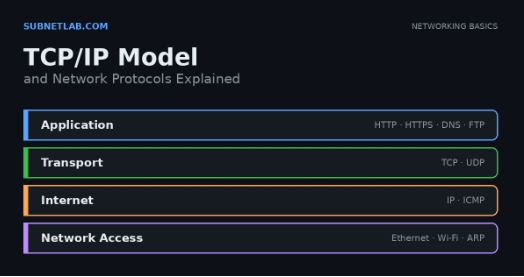 Network BlogAugust 25, 2026TCP/IP Model and Network Protocols Explained:TCP, UDP, ICMP, Handshakes, Flags, and Data Flow
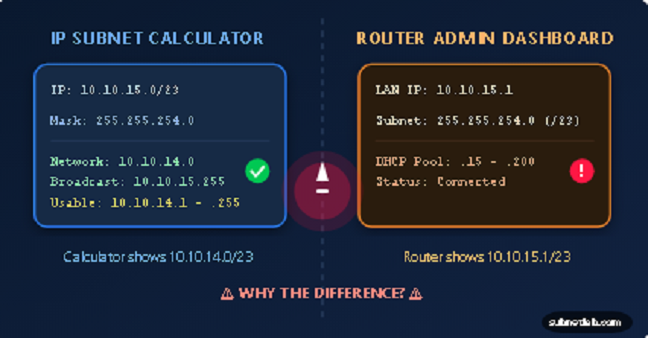 Network BlogAugust 11, 2026Router vs Calculator Showing Different Subnets? Why & the Fix
 Network BlogAugust 6, 2026Supernetting Explained: The Opposite of Subnetting
 Network BlogAugust 5, 2026Ping Command Explained:Your First Tool for Network Troubleshooting