
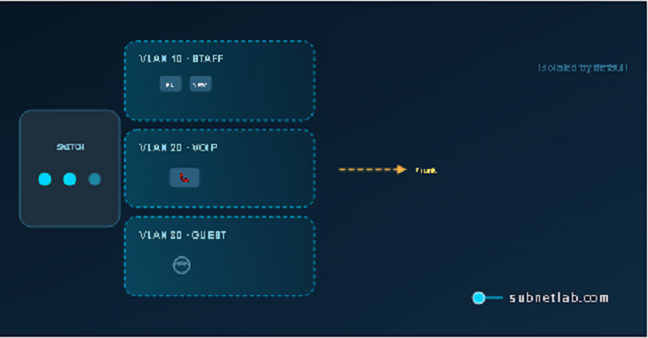
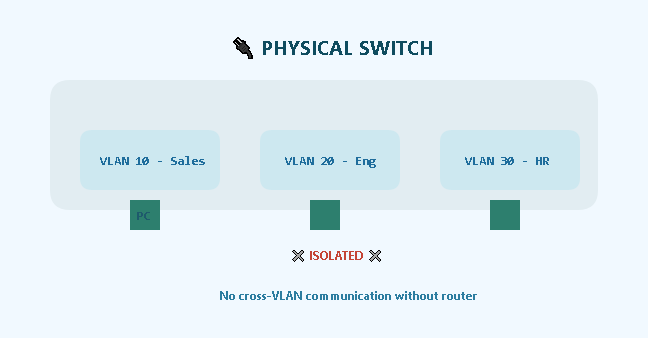
A VLAN Virtual Local Area Network is one physical switch acting like several separate switches. That’s the whole idea. One box, multiple isolated networks, no extra hardware needed.
Devices in the same VLAN talk to each other as if they’re plugged into the same switch, even when they’re two floors apart.
Devices in different VLANs stay separated by default no routing, no communication, unless you deliberately allow it.
Simple concept. Genuinely powerful in practice.
Why we Use VLANs?
- Security
By default, devices in different VLANs cannot communicate. A virus on a guest laptop cannot reach your finance server. A curious employee cannot browse HR files. Isolation is the default, not a bonus feature.
“A small clinic had patient records, reception desks, and public Wi-Fi all on the same flat network. A guest laptop got infected and started scanning everything in sight printers, servers, the lot. Within hours, reception couldn’t check patients in. Moving the Wi-Fi to its own VLAN fixed it completely. One config change. Never happened again.”
- Less Broadcast Noise
Ethernet networks depends on broadcasts messages sent to every device on a segment at the same time. On a flat network with 300 devices, one broadcast hits all 300. Scale that up and you’re burning real bandwidth on traffic that most devices don’t need.
VLANs confine broadcast traffic to their own segment. A broadcast in VLAN 10 never reaches VLAN 20. Think of it as shouting “lunch is ready” in a classroom with closed doors only your class hears it.
- Flexibility Without Rewiring
Moving someone from Sales to Engineering without VLANs means physically moving cables or patch panel connections. With VLANs, you change one line in the switch config. No ladder. No cable run. Done in sixty seconds.
How VLANs Actually Work
VLANs operate at Layer 2 of the OSI model the data link layer. Switches do the heavy lifting here, not routers. The standard that makes it all work is IEEE 802.1Q.
Two Types of Switch Ports
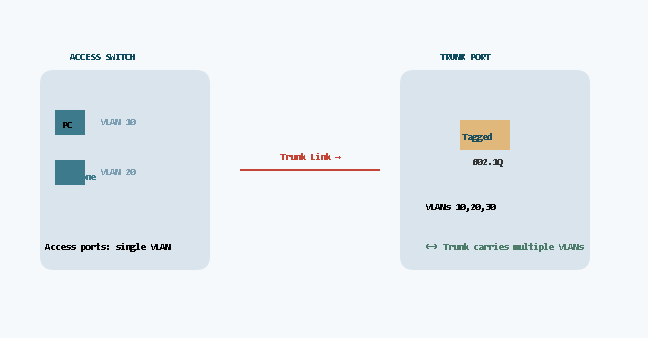
Every port on a managed switch is either an access port or a trunk port. Understanding the difference is the whole ballgame.
| Port Type | Carries | Typical Use | Tag Behavior |
| Access Port | One VLAN only | End devices — PCs, phones, printers, cameras | Tag added on ingress, removed on egress. Device never sees the tag. |
| Trunk Port | Multiple VLANs | Switch-to-switch links, switch-to-router links | Tag travels with the frame end to end. |
Memory trick: Access = one room, one key. Trunk = a hallway connecting many rooms.
VLAN Tagging The 802.1Q Standard
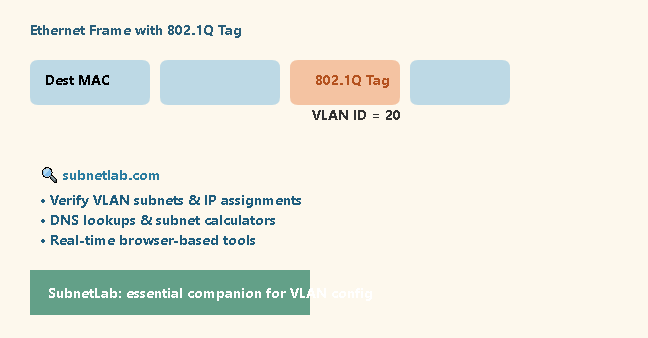
When a frame travels across a trunk port, the switch inserts a 4-byte tag into the Ethernet frame header. That tag holds the VLAN ID a number between 1 and 4094.
When the frame reaches the other end, the receiving switch reads the ID, forwards the frame to the correct ports, and strips the tag before delivering it to an end device.
Without that tag, the switch has no idea which virtual network a frame belongs to.
The tag is the entire mechanism four bytes doing a lot of work.
VLAN ID Reference Table
| VLAN ID Range | Category | Notes |
| 1 | Default VLAN | All ports belong here by default. Do not use for production traffic. |
| 2 – 1005 | Normal Range | Standard VLANs for everyday use. Supported on all managed switches. |
| 1006 – 1024 | Reserved (Cisco) | Reserved by Cisco IOS. Avoid on Cisco hardware. |
| 1025 – 4094 | Extended Range | Requires VTP transparent mode on Cisco. Not all switches support this range. |
| 4095 | Reserved | Reserved by 802.1Q. Never usable. |
Basic VLAN Configuration (Step by Step)
The commands below work on most managed switches , Cisco, Arista, and compatible platforms. Syntax varies slightly by vendor, but the logic is identical everywhere.
If you need to verify IP addressing after setting up your VLANs, the networking tools on SubnetLab can help you check subnets and run DNS lookups without leaving your browser.
Step 1 — Create the VLANs
vlan 10
name Sales
vlan 20
name Engineering
You’re telling the switch two virtual networks now exist. Nothing is assigned yet just the IDs and names.
Step 2 Assign Access Ports
interface ethernet 1/0/5
switchport mode access
switchport access vlan 10
Whatever you plug into port 1/0/5 is now in the Sales VLAN. The device plugged in never knows a VLAN exists — the switch handles the tagging invisibly.
Step 3 — Configure the Trunk Port
interface ethernet 1/0/24
switchport mode trunk
switchport trunk allowed vlan 10,20
Port 24 now carries both VLANs to another switch. The receiving switch needs those same VLANs created; that detail trips up a lot of people the first time around.
Step 4 Inter-VLAN Routing (When Needed)
VLANs are isolated by default. If Sales needs to reach a shared printer on the Engineering VLAN, you need a Layer 3 device to route between them. The most common approach for smaller setups is router-on-a-stick:
- Connect the router to a trunk port on the switch.
- Create sub-interfaces on the router, one per VLAN, each with its own IP subnet.
- Enable IP routing.
That configuration deserves its own article. For now: VLANs are isolated. Routing is a deliberate, separate step.
Real Example A Small Business Network
Here’s an actual layout built for a 20-person office on a single 24-port switch:
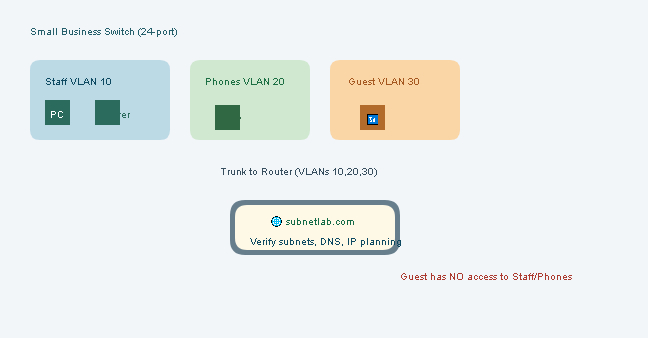
| VLAN ID | Name | Ports | Purpose |
| 10 | Staff | 1 – 10 | Computers, file server, internal printers |
| 20 | Phones | 11 – 15 | VoIP handsets — isolated for QoS and security |
| 30 | Guest Wi-Fi | 16 – 20 | Internet only — zero access to staff network |
| 999 | Native | Uplink only | Unused native VLAN — security measure |
The uplink to the router was a trunk carrying VLANs 10, 20, and 30. Guest Wi-Fi had full internet but couldn’t ping the staff file server — at all. That one change eliminated the monthly “my computer is slow” complaints. The owner called it magic. It’s just VLANs.
Security note: Change the native VLAN from the default (VLAN 1) to something unused — like VLAN 999 — and make sure it’s tagged. This prevents VLAN hopping attacks, where an attacker crafts double-tagged frames to jump between VLANs. It’s a real attack. The fix takes ten seconds.
Common Questions
Can I run VLANs on an unmanaged switch?
No. Unmanaged switches have no concept of VLANs they treat everything as a single network.
You need a managed switch with 802.1Q support. They’re not expensive; decent used ones are under $50.
What’s the difference between a VLAN and a subnet?
A VLAN is a Layer 2 concept it’s about switches and MAC addresses. A subnet is Layer 3 routers and IP addresses.
In practice, one VLAN usually maps to one subnet, but they’re technically separate things.
VLAN separates the segment; the subnet defines the IP space for that segment.
How many VLANs can I create?
802.1Q allows up to 4,094 (IDs 1 through 4094, with 0 and 4095 reserved).
That said, many entry-level managed switches support only 64 or 256 active VLANs.
Check your switch datasheet before planning a large deployment.
Does a VLAN make the network faster?
Indirectly. Reducing broadcast traffic frees up bandwidth that was previously wasted.
Your link speed doesn’t change 1 Gbps stays 1 Gbps.
Think of it as clearing noise off the road, not widening the road itself.
Is a VLAN the same as a VPN?
No VLANs live inside your local network on your switches, within your building.
VPNs encrypt traffic over the internet for remote access.
They both have “virtual” in the name, and that’s where the similarity ends.
Final Words
The first time I configured VLANs, I forgot to set the trunk port correctly. Nothing worked. Two hours of troubleshooting for something that turned out to be a single missing command.
That mistake taught me to verify native VLAN settings every time and to keep a dedicated management VLAN separate from user traffic.
You don’t need a rack of gear to learn this. A $50 used managed switch and two laptops will have you building and breaking VLANs in an afternoon. Break things deliberately. Fix them. Break them again. That’s the whole curriculum.
If this helped, share it with someone still intimidated by the words “trunk port.” And if something here is wrong or unclear drop a comment. I read all of them.
Author Profile

-
Muhammad Kazim Ali – Owner & Principal Engineer at SubnetLab.com (real-world networking labs).
10+ years in routing, switching & infrastructure design. Helps students, pros & enterprises master networking via practical labs. Based in Lahore, works with ISPs, data centers & tech teams.
📞 +92 343 5201037 (WhatsApp) | ✉️ subnetlab.official@gmail.com | 🌐 subnetlab.com
Latest entries
 Network BlogAugust 25, 2026TCP/IP Model and Network Protocols Explained:TCP, UDP, ICMP, Handshakes, Flags, and Data Flow
 Network BlogAugust 11, 2026Router vs Calculator Showing Different Subnets? Why & the Fix
 Network BlogAugust 6, 2026Supernetting Explained: The Opposite of Subnetting
 Network BlogAugust 5, 2026Ping Command Explained:Your First Tool for Network Troubleshooting