
In this guide you will learn the following:
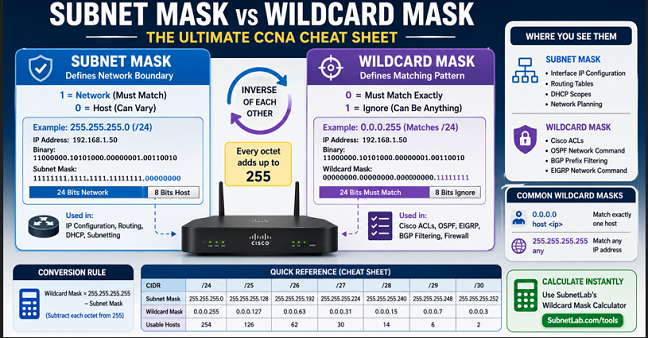
The difference between subnet masks and wildcard masks, how exactly they differ in binary, and how both are used in real Cisco configurations—a full side-by-side comparison cheat sheet is available that helps you in conversions like subnet mask to wildcard mask & wildcard mask to subnet mask.
Mostly networking students get stuck at some point: configuring a Cisco router, and the command wants a wildcard mask, but you know only subnet masks. So don’t get in a panic; we have a solution for you in the shape of a tool available on our website.
Yes, they are both related to each other; in mathematical terms, they are inverses of each other. But they serve completely different purposes, appear in completely different places, and confusing the two can break your ACLs, your OSPF adjacencies, or your entire routing policy.
This guide settles it once and for all with clear binary comparisons, real Cisco IOS examples, and a conversion method you’ll never forget.
Quick Answer
There are two parts of an IP address in a subnet. One is called the network, and the other is called the host, which are represented in binary form, 0 & 1. “0” represents the network portion, and “1” represents the host portion. A subnet mask uses binary bits to identify the network portion and the host portion of an IP address. used when assigning IP addresses and making routing decisions.
“Wildcard mask in plain English: 0 = this bit MUST match; 1 = this bit can be ANYTHING. It’s the opposite of a subnet mask. Used in Cisco ACLs and OSPF routing.” in Cisco ACLs and OSPF routing. Subnet Mask 255.255.255.0 written 0.0.0.255 in case of wildcard mask
📋 Table of Contents
- What is a subnet mask?
- What is a wildcard mask?
- Binary comparison — seeing the inverse relationship
- Key differences at a glance
- How to convert subnet mask to wildcard mask
- Where each mask is used in real networking
- Wildcard masks in Cisco ACLs — real examples
- Wildcard masks in OSPF configuration
- Special wildcard masks: 0.0.0.0 and 255.255.255.255
- Cheat sheet — subnet mask vs wildcard mask
- Common mistakes and how to avoid them
- Frequently asked questions
Subnet Mask
What Is a Subnet Mask?
A subnet mask is just a 32-bit number that works with an IPv4 address. Its job is to draw a line between the network part and the host part of that address.
Every device on an IP network uses a subnet mask — whether it knows it or not.
Just follow this simple rule:
Binary 1 represents the network portion
Binary 0 represents the host portion.
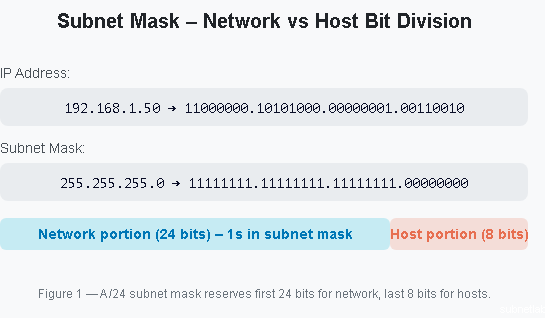
Subnet mask in binary—identifying network vs host bits
| Notation Type | Example | What It Represents |
|---|---|---|
| Dotted-decimal | 255.255.255.0 | Subnet mask in four 8-bit decimal numbers |
| CIDR prefix | /24 | Number of consecutive 1 bits in the mask (from left to right) |
Where subnet masks appear
- IP address configuration on every network device, such as router interface, workstations, switches etc.
- Routing tables, routers need subnet masks to determine the network portion an IP address belongs to.
- DHCP server scopes the mask is also provided with IP addresses to every client.
- Network planning and design—subnetting calculations always start with the subnet mask
Core function of a subnet mask: It tells a device and any router in the path which part of an IP address identifies the network and which part identifies the individual host. Without it, no routing decision can be made correctly.
Subnet Mask — Network vs Host Bit Division
Visual showing how a 255.255.255.0 subnet mask splits an IPv4 address into its 24-bit network portion and 8-bit host portion in binary form.
Figure 1—A /24 subnet mask (255.255.255.0) reserves the first 24 bits for the network and the last 8 bits for host addressing, supporting up to 254 usable devices per subnet.
Wildcard Mask
What Is a Wildcard Mask?
A wildcard mask is also a 32-bit number used as a pattern-matching tool. Rather than defining a network boundary, it defines which bits of an IP address a device or routing protocol should care about and which bits it’s allowed to ignore.
The logic is the inverse of a subnet mask:
- A 0 bit in the wildcard mask means “this bit must match exactly.”
- A 1 bit in the wildcard mask means “this bit can be anything—ignore it.”
That’s why wildcard masks are sometimes called inverse masks.
Wildcard mask — 0 = must match, 1 = ignore
To check whether 192.168.1.50 matches the rule 192.168.1.0 with the wildcard mask 0.0.0.255, the router only checks the first three parts of the IP address.
IP Address: 192.168.1.50
Wildcard Mask: 0.0.0.255
The wildcard mask tells the router to:
- Match the first three octets exactly: 192.168.1
- Ignore the last octet: 50
Since the first three octets match, the address 192.168.1.50 matches the rule.
Result: 192.168.1.50 matches the rule
In simple terms, the wildcard mask 0.0.0.255 means:
“Check that the address starts with 192.168.1, but allow any number in the last section.”
Because of this, every IP address from 192.168.1.0 to 192.168.1.255 will match.
Important point: Wildcard masks are not used to assign IP addresses or create subnets. They are only used to match IP addresses in routing rules, ACLs, and network configurations.
Wildcard Mask — Pattern Matching Logic
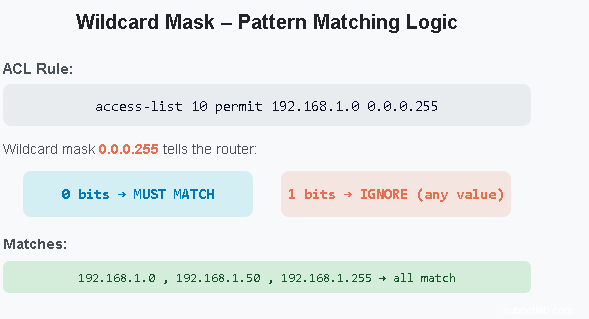
Diagram showing how a wildcard mask of 0.0.0.255 matches all addresses in the 192.168.1.0/24 range, with 0-bits enforcing a match and 1-bits allowing any value.
Figure 2 — A wildcard mask of 0.0.0.255 applied to 192.168.1.0 matches every address from 192.168.1.0 through 192.168.1.255, making it equivalent to the /24 subnet but expressed as a matching rule rather than a network boundary.
Binary Comparison
Seeing the Inverse Relationship in Binary
The cleanest way to understand the relationship between these two masks is to look at them side by side in binary. They are literal bitwise inverses of each other — wherever one has a 1, the other has a 0, without exception.
Example 1 — /24 network (most common)
Subnet mask: 255 . 255 . 255 . 0 Binary: 11111111.11111111.11111111. 00000000 Wildcard mask: 0 . 0 . 0 . 255 Binary: 00000000.00000000.00000000.11111111 Every bit is flipped. They add up to: 255.255.255.255
Example 2 — /26 network (62 hosts per subnet)
Subnet mask: 255 . 255 . 255 . 192 Binary: 11111111.11111111.11111111.11000000 Wildcard mask: 0 . 0 . 0 . 63 Binary: 00000000.00000000.00000000.00111111 Sum: 255.255.255.255 ✅
Example 3 — /27 network (30 hosts per subnet)
Subnet mask: 255 . 255 . 255 . 224 Binary: 11111111.11111111.11111111.11100000 Wildcard mask: 0 . 0 . 0 . 31 Binary: 00000000.00000000.00000000.00011111 Sum: 255.255.255.255 ✅
The universal rule: Add any subnet mask octet to its corresponding wildcard mask octet and you always get 255. This is the mathematical relationship that defines the inverse. Use it to check your work instantly.
Key Differences at a Glance
Before going deeper into usage examples, here’s a side-by-side comparison of everything that distinguishes these two masks:
Subnet Mask
- 1 bits = network portion
- 0 bits = host portion
- Defines network boundaries
- Used in IP configuration
- Used in routing tables
- Used in DHCP scopes
- Written as 255.255.255.x
- Also written as /24 (CIDR)
- Always contiguous 1s then 0s
Wildcard Mask
- 0 bits = must match exactly
- 1 bits = ignore (any value)
- Defines matching patterns
- Used in Cisco ACLs
- Used in OSPF network commands
- Used in BGP prefix filtering
- Written as 0.0.0.x
- No CIDR equivalent
- Can be non-contiguous (advanced)
| Property | Subnet Mask | Wildcard Mask |
| Binary 1 bit means | Network bit (must be fixed) | Ignore this bit (any value) |
| Binary 0 bit means | Host bit (variable) | Must match exactly |
| Primary purpose | Define network/host boundary | Match IP address ranges |
| Used in | IP config, routing, DHCP | ACLs, OSPF, BGP filtering |
| Platform | All platforms and OSes | Primarily Cisco IOS / IOS-XE |
| CIDR notation | Yes (/24, /26, /27 etc.) | No CIDR equivalent |
| Must be contiguous? | Yes — always contiguous 1s | No — can be non-contiguous |
| Typical example | 255.255.255.0 | 0.0.0.255 |
| Relationship | Bitwise inverses — each octet adds to 255 | |
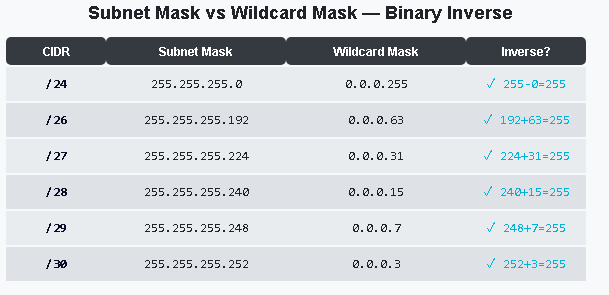
Subnet Mask vs Wildcard Mask — Side-by-Side Binary Comparison
Visual table showing subnet masks and their corresponding wildcard mask inverses across /24, /25, /26, /27, /28, /29, and /30 prefix lengths.
Figure 3 — Subnet masks and wildcard masks are exact binary inverses. For any given prefix length, the two values always sum to 255.255.255.255 in every octet — a relationship that makes conversion simple and error-free.
Conversion
How to Convert a Subnet Mask to a Wildcard Mask
Converting between the two is straightforward once you know the rule. There are two reliable methods — use whichever clicks more naturally for you.
Method 1 — Subtract from 255 (fastest)
Subtract each octet of the subnet mask from 255. That’s it.
Wildcard mask = 255.255.255.255 − Subnet mask
Conversion examples using the 255-subtraction method
| Subnet Mask | CIDR | Wildcard Mask |
|---|
| 255.255.255.0 | /24 | 0.0.0.255 |
| 255.255.255.192 | /26 | 0.0.0.63 |
| 255.255.255.224 | /27 | 0.0.0.31 |
| 255.255.255.240 | /28 | 0.0.0.15 |
Method 2 — Flip the bits (binary inversion)
Convert the subnet mask to binary, then flip every bit (0 becomes 1, 1 becomes 0), then convert back to decimal. This is the mathematically precise method — useful when working with non-standard masks.
Binary inversion method — /26 example
Subnet mask 255.255.255.192: Binary: 11111111.11111111.11111111.11000000 Flip every bit: 00000000.00000000.00000000.00111111 Convert back to decimal: Wildcard mask = 0.0.0.63 ✅
Quick tip: Use the SubnetLab Wildcard Mask Calculator to convert any subnet mask to its wildcard equivalent instantly — no mental math needed.
Real-World Usage
Where Each Mask Is Used in Real Networking
Understanding the difference in theory is one thing. Knowing exactly where each mask appears in a real network is what separates someone who’s read about networking from someone who actually configures it. Here’s the breakdown.
Subnet masks — where you’ll see them
- Network interface configuration — every interface on a router, switch, server, or workstation needs an IP address and a subnet mask to function
- DHCP server configuration — when a DHCP server assigns an IP address to a client, it always includes the subnet mask in the lease
- Static routing — route entries use subnet masks (or CIDR prefixes) to match destination networks
- Subnetting calculations — all subnet design, VLSM planning, and IP address allocation uses subnet masks as the primary tool
- Cloud networking — AWS VPCs, Azure VNets, and Google Cloud subnets all express network ranges using CIDR prefix notation (which maps directly to subnet masks)
Wildcard masks — where you’ll see them
- Cisco ACLs (Access Control Lists) — the most common use case; wildcard masks define which source or destination IPs an ACL rule applies to
- OSPF network statements — when advertising networks into OSPF, the network command requires a wildcard mask to define the matching range
- BGP prefix filtering — wildcard masks can appear in prefix lists and route maps for fine-grained BGP traffic engineering
- EIGRP network statements — same concept as OSPF, wildcard masks define which interfaces participate in EIGRP
- Cisco firewall policies — ACL-based firewall rules on Cisco ASA and IOS-based firewalls use wildcard masks for IP matching
Cisco ACL
Wildcard Masks in Cisco ACLs — Real Configuration Examples
Access Control Lists are the most common place you’ll encounter wildcard masks in the real world. When you write an ACL rule on a Cisco router or switch, you’re telling the device: “Match these IP addresses and do this action.” The wildcard mask is what defines which IP addresses the rule applies to.
Example 1 — Permit an entire /24 network
Allow all traffic from the 192.168.1.0/24 network. The wildcard 0.0.0.255 means “match any address where the first three octets are 192.168.1”.
Cisco IOS — Standard ACL
Router(config)# access-list 10 permit 192.168.1.0 0.0.0.255 ! Matches: 192.168.1.0 through 192.168.1.255 (all 256 addresses) ! Equivalent subnet: 255.255.255.0 (/24)
Example 2 — Permit only one specific host
Use a wildcard of 0.0.0.0 to match a single IP address exactly. Every bit must match — nothing is ignored.
Cisco IOS — Match a single host
Router(config)# access-list 10 permit 192.168.1.50 0.0.0.0 ! Matches: 192.168.1.50 only — no other address ! Shorthand: you can also write “host 192.168.1.50”! These two commands are identical: Router(config)# access-list 10 permit 192.168.1.50 0.0.0.0 Router(config)# access-list 10 permit host 192.168.1.50
Example 3—Permit a /26 subnet
Allow traffic only from the first quarter of a /24 block—addresses 192.168.1.0 through 192.168.1.63.
Cisco IOS — Match a /26 subnet
Router(config)# access-list 20 permit 192.168.1.0 0.0.0.63 ! Matches: 192.168.1.0 through 192.168.1.63 (64 addresses) ! Wildcard 0.0.0.63 = subnet mask 255.255.255.192 (/26) ! Equivalent: permit 192.168.1.0/26
Example 4 — Block a specific subnet, permit everything else
Cisco IOS — Extended ACL with deny and permit
Router(config)# ip access-list extended BLOCK_GUEST Router(config-ext-nacl)# deny ip 192.168.1.192 0.0.0.63 any ! Blocks all traffic from the Guest Wi-Fi subnet (192.168.1.192/26) Router(config-ext-nacl)# permit ip any any ! Allow all other traffic
Always remember the implicit deny: Every Cisco ACL has an invisible deny any any at the very end. If a packet doesn’t match any rule in your ACL, it’s dropped — silently. This catches many beginners off guard.
🛡️
Cisco ACL with Wildcard Masks — Traffic Filtering Diagram
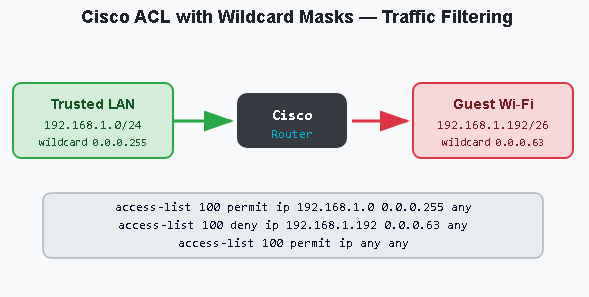
Network diagram showing how a Cisco router uses ACL wildcard masks to permit traffic from 192.168.1.0/24 (wildcard 0.0.0.255) while denying the guest subnet 192.168.1.192/26 (wildcard 0.0.0.63).
Figure 4 — Cisco ACLs use wildcard masks to define which IP addresses each rule applies to. The wildcard 0.0.0.255 matches an entire /24 network; the wildcard 0.0.0.63 narrows the match to a specific /26 subnet.
OSPF
Wildcard Masks in OSPF Configuration
Subnet Mask vs Wildcard Mask-Reference TableOSPF (Open Shortest Path First) is one of the most widely deployed dynamic routing protocols in enterprise and service provider networks. When you configure OSPF on a Cisco router, the network command tells the protocol which interfaces to activate on — and it uses a wildcard mask to define that range.
This is one of the most common places network engineers get confused: they try to use a subnet mask in an OSPF network command and wonder why it doesn’t work the way they expect.
Cisco IOS — OSPF network command using wildcard masks
Router(config)# router ospf 1 Router(config-router)# network 192.168.1.0 0.0.0.255 area 0 ! Activates OSPF on all interfaces with addresses in 192.168.1.0/24 Router(config-router)# network 10.0.0.0 0.255.255.255 area 0 ! Activates OSPF on all interfaces with addresses in 10.0.0.0/8 (entire Class A block) Router(config-router)# network 192.168.10.64 0.0.0.63 area 1 ! Activates OSPF only on the interface matching 192.168.10.64/26 — placed in Area 1
Modern Cisco IOS alternative: In newer IOS versions (15.x and later), you can configure OSPF directly on the interface using ip ospf 1 area 0 — which doesn’t require a wildcard mask at all. However, the network command with wildcard masks remains common in legacy configurations and on CCNA exams.
Special Cases
Special Wildcard Masks: 0.0.0.0 and 255.255.255.255
Two wildcard mask values have special significance in Cisco networking—you’ll encounter both regularly.
Wildcard mask 0.0.0.0 — exact host match
When every bit in the wildcard mask is 0, every bit in the IP address must match exactly. This matches one specific host and nothing else. Cisco IOS also accepts the keyword host as a shorthand for this mask.
Cisco IOS — exact host match
! These two lines do exactly the same thing: Router(config)# access-list 10 permit 10.1.1.1 0.0.0.0 Router(config)# access-list 10 permit host 10.1.1.1 ! Both match only 10.1.1.1 — no other address
Wildcard mask 255.255.255.255 — match any address
When every bit is 1, every bit is ignored — so the mask matches any IP address regardless of its value. Cisco IOS also accepts the keyword any as shorthand.
Cisco IOS — match any address
! These two lines do exactly the same thing: Router(config)# access-list 10 permit 0.0.0.0 255.255.255.255 Router(config)# access-list 10 permit any ! Both match every possible IP address
| Wildcard mask | Cisco shorthand | Meaning | Common use |
| 0.0.0.0 | host <ip> | Match exactly one specific host | Permit/deny a single device |
| 255.255.255.255 | any | Match any IP address | Permit all, or as implicit deny |
Cheat Sheet — Subnet Mask vs Wildcard Mask
Save this table. It covers every prefix length you’ll encounter in CCNA studies and real enterprise networks.
Subnet Mask vs Wildcard Mask — Complete Reference Table
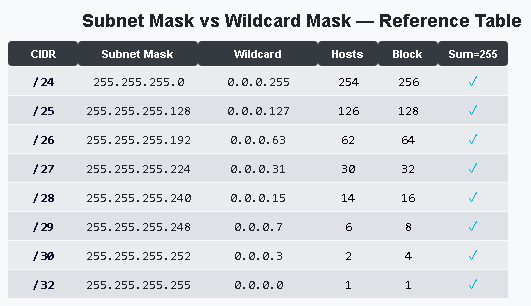
Full cheat sheet table showing CIDR prefixes /8 through /32 with their corresponding subnet masks, wildcard masks, usable host counts, and block sizes.
Figure 5 — Complete subnet mask and wildcard mask reference for all common prefix lengths. For every row, adding the subnet mask octet to the wildcard mask octet yields exactly 255 — confirming the inverse relationship.
Common Mistakes — and How to Avoid Them
Mistakes that break real configurations
- Using a subnet mask in a Cisco ACL — entering 255.255.255.0 instead of 0.0.0.255 is one of the most common Cisco config errors. The ACL will compile without an error, but will match the completely wrong set of addresses.
- Using a wildcard mask in interface IP configuration — assigning an IP address with a wildcard mask instead of a subnet mask will either fail or produce unpredictable routing behavior.
- Forgetting the implicit deny at the end of an ACL—if your ACL doesn’t end with a permit any or permit ip any any, all unmatched traffic is silently dropped.
- Getting the OSPF wildcard wrong — if your network command wildcard doesn’t match your interface IP, OSPF won’t activate on that interface, and no adjacencies will form.
Best practices to build
- Memorize the conversion rule: 255 minus each subnet mask octet equals the wildcard. This should be automatic.
- Double-check context before typing a mask — ask yourself: is this for IP config (subnet mask) or for ACL/OSPF (wildcard mask)?
- Use the host and any keywords — they’re cleaner and reduce the chance of error for the two most common wildcard cases.
- Verify with show ip access-lists — after configuring an ACL, always verify it matches traffic correctly using Cisco’s show commands.
Critical exam tip: On the CCNA exam, wildcard mask questions are extremely common. The test frequently shows you an ACL statement and asks which addresses it matches — or gives you a network range and asks you to write the correct wildcard. Practice the 255-subtraction method until it’s effortless.
Calculate wildcard masks instantly
Use SubnetLab’s free Wildcard Mask Calculator — enter any subnet mask or CIDR prefix and get the wildcard mask in one click.
Open Wildcard Mask Calculator →
Frequently Asked Questions
What is the key difference between a wildcard mask and a subnet mask?
A subnet mask uses binary 1s to mark the network portion of an IP address and is used to define network boundaries in IP configuration and routing. A wildcard mask is the bitwise inverse — its 0s mark bits that must match and its 1s mark bits that are ignored — and is used as a pattern-matching tool in Cisco ACLs and routing protocols like OSPF and EIGRP.
How do you convert a subnet mask to a wildcard mask?
Subtract each octet of the subnet mask from 255. For example: subnet mask 255.255.255.192 becomes wildcard mask 0.0.0.63 (because 255−255=0, 255−255=0, 255−255=0, 255−192=63). You can also use the SubnetLab Wildcard Mask Calculator to convert instantly.
Why does OSPF use wildcard masks instead of subnet masks?
The OSPF network command was designed to match a range of interface IP addresses — not to define a network boundary. A wildcard mask is a flexible pattern-matching tool suited for this purpose. It allows a single network statement to activate OSPF on multiple interfaces with different subnet masks as long as their addresses fall within the specified range.
Can a wildcard mask be non-contiguous?
Yes — and this is a key difference from subnet masks. While subnet masks must always be contiguous (a series of 1s followed by a series of 0s with no mixing), wildcard masks can have 1s and 0s in any order. This allows advanced matching patterns, such as matching only even or only odd IP addresses in a range. This is rare in practice but occasionally appears in advanced Cisco configurations.
What does wildcard mask 0.0.0.0 mean?
A wildcard mask of 0.0.0.0 means every bit must match exactly — so it identifies one specific host address with no flexibility. In Cisco IOS, you can use the keyword host as shorthand: permit host 192.168.1.10 is identical to permit 192.168.1.10 0.0.0.0.
Is a wildcard mask the same as an inverse mask?
Yes — wildcard mask and inverse mask are two names for exactly the same thing. “Inverse mask” is the more mathematically descriptive name (because it’s the bitwise inverse of the subnet mask), while “wildcard mask” is the more common term used in Cisco documentation and CCNA study materials.
Does Linux or Windows use wildcard masks?
No. Linux, Windows, and macOS use subnet masks (or CIDR prefix notation) exclusively for IP address configuration and routing. Wildcard masks are primarily a Cisco IOS construct and are not natively used in standard operating system network stacks. Some open-source routing software (like Quagga/FRRouting) does support wildcard masks in OSPF configuration to maintain compatibility with Cisco conventions.
Related Articles and Tools on SubnetLab
- Wildcard Mask Calculator — Convert any subnet mask instantly
- How to Subnet a Network Step by Step — Complete Beginner’s Guide
- VLSM Calculator — Variable Length Subnet Masking
- IPv6 Subnet Calculator
- CIDR to IP Range Converter
Written by the SubnetLab Team
SubnetLab.com provides free networking tools and expert guides for IT students, network engineers, and CCNA candidates worldwide — including users in Pakistan, India, the US, UK, and beyond.
Author Profile

-
Muhammad Kazim Ali – Owner & Principal Engineer at SubnetLab.com (real-world networking labs).
10+ years in routing, switching & infrastructure design. Helps students, pros & enterprises master networking via practical labs. Based in Lahore, works with ISPs, data centers & tech teams.
📞 +92 343 5201037 (WhatsApp) | ✉️ subnetlab.official@gmail.com | 🌐 subnetlab.com
Latest entries
 Network BlogAugust 25, 2026TCP/IP Model and Network Protocols Explained:TCP, UDP, ICMP, Handshakes, Flags, and Data Flow
 Network BlogAugust 11, 2026Router vs Calculator Showing Different Subnets? Why & the Fix
 Network BlogAugust 6, 2026Supernetting Explained: The Opposite of Subnetting
 Network BlogAugust 5, 2026Ping Command Explained:Your First Tool for Network Troubleshooting