
In this article, we will learn about conversion methods. Especially after converting an IPv4 address to an IPv6 address, the result isn’t just one format; there are multiple standards for different use cases.
Network engineers, developers, and cloud architects frequently need to understand which format to use for socket programming, firewall rules, tunneling, or NAT64 translation.
The most common mistake?
Mostly people use wrong scenario because they don’t know the actual format which is a mistake often people do this.
For Dual stack socket programming, an IPv4‑mapped address (::ffff:192.0.2.1) works perfectly but breaks if you use a 6to4 tunnel. The reference tables helps you to pick the right format.
IPv4‑Mapped IPv6 Addresses (::ffff:w.x.y.z)
Format: This Format you will use ::ffff.w.x.y.z but in decimal representation ipv4 address is w.x.y.z
What it is: An IPv4‑mapped IPv6 address stands for an IPv4 node inside the IPv6 address space. ::ffff:0:0/96 is the prefix use for this purpose. These addresses are never transmitted on the network they exist only inside the host’s networking stack.
When to use it:
Socket programming
After Enabling IPv6‑enabled application it accepts both IPv4 and IPv6 connections :: (all interfaces) .
Logging and debugging
To display IPv4 addresses in a combined IPv6 log format.
Dual‑stack environments
IPv6 API is used in applications need to handle IPv4 peers .
Example: IPv4 address 192.168.1.1 represents as → ::ffff:192.168.1.1
Conversion Logic: The IPv4 address is fixed in the low‑order 32 bits of the IPv6 address.
FieldValue:
Prefix::ffff:0:0/96 IPv4 Address192.168.1.1 Converted IPv6::ffff:192.168.1.1
RFC Reference: RFC 4291 (Section 2.5.5.2)
IPv4‑Compatible IPv6 Addresses (::w.x.y.z) disapprove of
Format: ::w.x.y.z
What it is: An older format that also used in IPv4 address in the low‑order 32 bits, but without the ffff marker.
Status: disapprove of In new deployments it does not work .
Why it’s offensive The lack of a individual indicator caused doubt in address parsing. IPv4‑mapped addresses (::ffff) is the modern technique standard
Example: IPv4 address Format 192.168.1.1 → mapped address ::192.168.1.1
6to4 Addresses (2002:IPv4_hex::/48)
Format: 2002:WWXX:YYZZ:(subnet ID::/64
What it is: 6to4 is basically an automatic tunnel mechanism that allows IPv6‑only hosts to communicate over IPv4‑only networks. The IPv4 address of the border router is set in in the IPv6 prefix.
The 6to4 Prefix: 2002::/16 is allocated IPv6 prefix for 6to4.
2002::/16 is the reserved IPv6 prefix for 6to4. The next 32 bits contain the IPv4 address in hexadecimal range (bits 17–48).
When to use it:
Connecting IPv6 “islands” over IPv4‑only communications
Early IPv6 adoption scenarios (largely replaced by better mechanisms today)
Example: For IPv4 address 192.0.2.1:
192 in hex = c0,
0 in hex = 00,
2 in hex = 02,
1 in hex = 01
Result: 2002:c000:0201::/48
FieldValuePrefix2002::/16
IPv4 Address (hex)c000:0201
Converted IPv62002:c000:0201::/48
RFC Reference: RFC 3056
NAT64 (IPv4‑Embedded IPv6 Addresses) 64:ff9b::w.x.y.z
Format: 64:ff9b::w.x.y.z
What it is: NAT64 is a conversion mechanism that allows IPv6 clients to communicate with IPv4‑only servers. It uses an IPv4‑embedded IPv6 address where the IPv4 address is programmed in the low order 32 bits of an IPv6 prefix.
The Well‑Known Prefix: 64:ff9b::/96 is the Well‑Known Prefix defined in RFC 6052. When an IPv6‑only host needs to reach an IPv4 destination, DNS64 produce an AAAA record using this prefix, and NAT64 translates it back to IPv4.
When to use it:
IPv6‑only networks that still need to reach IPv4‑only services (like apt-get update)
Cloud environments Running IPv6‑only subnets with NAT64/DNS64 egress
Example: IPv4 address 8.8.8.8 (Google DNS)
→ 8.8.8.8 in hex = 08080808,
Result: 64:ff9b::0808:0808
FieldValueWell‑Known Prefix64:ff9b::/96 IPv4 Address (hex)08080808 Converted IPv6 64:ff9b::0808:0808
Important: The Well‑Known Prefix should not be used for non‑global (private) IPv4 addresses (RFC 1918) in some implementations. Check your NAT64/DNS64 configuration.
RFC Reference: RFC 6052
Teredo Addresses (2001:0000::/32)
Format: 2001:0000:WWXX:YYZZ:... (complex, embeds IPv4 address + port + flags)
What it is: Teredo is an IPv6 change mechanism that provides IPv6 connectivity to hosts behind IPv4 NATs because 6to4 fails and does not work. It encapsulates IPv6 packets inside IPv4 UDP datagrams.
When to use it:
Hosts behind IPv4 NAT devices that cannot run 6to4
Consumer networks where the ISP doesn’t provide native IPv6
Example: IPv4 address 192.0.2.1 fixed in a Teredo address with a specific Teredo server prefix.
FieldValue: Teredo Prefix 2001:0000::/32
IPv4 AddressEncoded in Teredo server IPv4PortObfuscated port field
RFC Reference: RFC 4380
ISATAP Addresses
Format: fe80::5efe:w.x.y.z For link local
Global prefix + ::5efe:w.x.y.z
What it is: ISATAP stands for (Intra‑Site Automatic Tunnel Addressing Protocol). it is used to provides IPv6 connectivity within an IPv4 intranet which is not accessible to the public because it’s not connected to internet. It treats the IPv4 network as a virtual IPv6 link.
When to use it:
Enterprise networks transitioning to IPv6 internally
Sites that want to deploy IPv6 without upgrading every router
Example: IPv4 address 192.168.1.1 → fe80::5efe:192.168.1.1
FieldValue:ISATAP Identifier 5efe IPv4 Address
Address 192.168.1.1 Link‑Local Address fe80::5efe:192.168.1.1
RFC Reference: RFC 5214
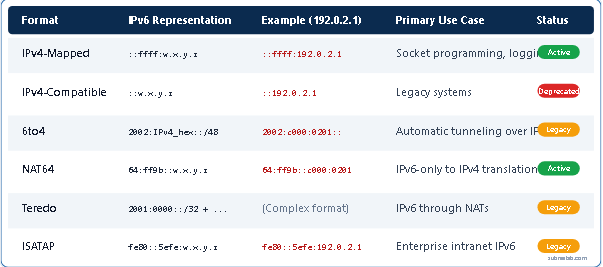
Quick Reference: Conversion Format Comparison Table
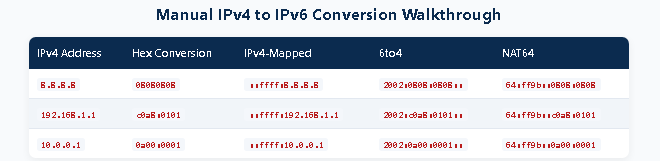
Conversion Logic: How to Convert Manually
If you ever need to convert an IPv4 address to IPv6 manually, here’s the logic:
Step 1: Convert each IPv4 octet to hexadecimal.
192 → c0, 0 → 00, 2 → 02, 1 → 01
Step 2: Combine the hex values into a 32‑bit string: c000:0201
Step 3: Apply the appropriate prefix:
IPv4‑Mapped: ::ffff:c000:0201
6to4: 2002:c000:0201::/48
NAT64: 64:ff9b::c000:0201
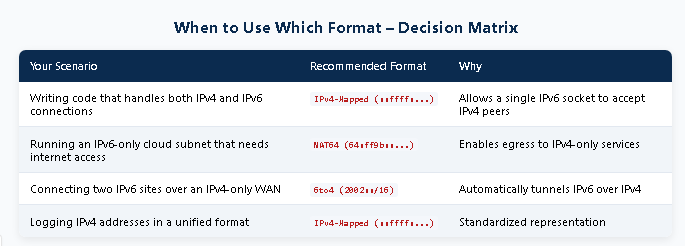
Print‑Friendly Cheat Sheet
For Network Engineers: Bookmark this section or print it for your desk.
Quick Format Reference – IPv4: 192.0.2.1FormatIPv6 RepresentationUse CaseIPv4‑Mapped::ffff:192.0.2.1Socket programmingIPv4‑Compatible::192.0.2.1DEPRECATED6to42002:c000:0201::/48Tunneling over IPv4NAT6464:ff9b::c000:0201IPv6‑only → IPv4 egresssubnetlab.com
Frequently Asked Questions
Q1: What’s the difference between IPv4‑mapped and IPv4‑compatible addresses?
IPv4‑mapped (::ffff:w.x.y.z) is the modern standard it clearly identifies that the address represents an IPv4 node. IPv4‑compatible (::w.x.y.z) is disapprove of and should not be used in new deployments.
Q2: When should I use NAT64 format vs. IPv4‑mapped format?
IPv4‑mapped is used inside the host for socket programming and logging.
NAT64 (64:ff9b::...) is used on the network when an IPv6‑only host needs to reach an IPv4‑only server.
Q3: Can I use IPv4‑mapped addresses in firewall rules?
Yes, but carefully. IPv4‑mapped addresses work for logging and some socket configurations. However, for network‑level firewall rules, you should use the actual IPv6 prefix (like 2001:db8::/64) or the NAT64 prefix (64:ff9b::/96) depends on your deployment.
Q4: What is the Well‑Known Prefix 64:ff9b::/96 used for?
It’s the NAT64 Well‑Known Prefix. When an IPv6‑only host queries DNS for an IPv4‑only domain, DNS64 returns an IPv6 address in this prefix. NAT64 then translates traffic to this prefix back to IPv4.
Q5: Is 6to4 still relevant in 2026?
Mostly legacy. 6to4 is still used in some automatic tunneling scenarios, but modern deployments prefer native IPv6, IPv6‑mostly architectures, or NAT64/DNS64. If you’re starting fresh, avoid 6to4.
Q6: How do I check which format my tool outputs?
Use our IPv4 to IPv6 Converter it displays all major formats side‑by‑side so you can see exactly which one you need.
Conclusion
Understanding IPv4 to IPv6 conversion formats is important in modern network engineering. Whether you’re writing socket code, configuring firewalls, or deploying IPv6‑only infrastructure, choosing the right format saves hours of debugging.
Quick Recap:
IPv4‑Mapped (::ffff:...) → Socket programming and logging
NAT64 (64:ff9b::...) → IPv6‑only to IPv4 egress
6to4 (2002::/16) → Automatic tunneling (legacy)
IPv4‑Compatible (::...) → Deprecated — avoid
Author Profile

-
Muhammad Kazim Ali – Owner & Principal Engineer at SubnetLab.com (real-world networking labs).
10+ years in routing, switching & infrastructure design. Helps students, pros & enterprises master networking via practical labs. Based in Lahore, works with ISPs, data centers & tech teams.
📞 +92 343 5201037 (WhatsApp) | ✉️ subnetlab.official@gmail.com | 🌐 subnetlab.com
Latest entries
 Network BlogAugust 25, 2026TCP/IP Model and Network Protocols Explained:TCP, UDP, ICMP, Handshakes, Flags, and Data Flow
 Network BlogAugust 11, 2026Router vs Calculator Showing Different Subnets? Why & the Fix
 Network BlogAugust 6, 2026Supernetting Explained: The Opposite of Subnetting
 Network BlogAugust 5, 2026Ping Command Explained:Your First Tool for Network Troubleshooting