
MAC stands for Media Access Control. It is a unique identification of a device that is connected in any network, like a laptop, camera, phone, printer, smart TV, etc. It is a 48-bit unique address that is allocated by an identifier and built into the Network Interface Card. Every device has a unique identification, like a fingerprint.
You can change your IP address anytime. . But the MAC address remains the same forever; only spoofing can change the MAC address, which is illegal. The SubnetLab MAC Address Lookup tool lets you take any MAC address and instantly find out which company manufactured that device.
It works by checking the IEEE OUI (Organizationally Unique Identifier) Registry, the official global database where every hardware manufacturer must register before producing network devices. The tool also supports reverse lookup, so you can type a vendor name like “Cisco” or “Apple” and get back all the MAC address ranges registered to them.
This is not just a student tool. Network admins use it daily for device identification, network security audits, and ARP table analysis.
MAC Address Lookup
2. The Hidden Identity Inside Every MAC
And then there are MAC addresses. The first part of any MAC address is the OUI (Organizationally Unique Identifier). That’s the first 24 bits—meaning the first three groups of letters and numbers. IEEE (Institute of Electrical and Electronics Engineers) is the group that keeps a public list.
So every company that makes network devices has to add their unique OUI to that list before selling anything. Makes sense. So when you see a MAC address like 3C:22:FB:xx:xx:xx, a quick lookup tells you Apple Inc. made it. And that’s not a guess – it’s an official record. (I think that’s pretty cool, but hey, what do I know?)
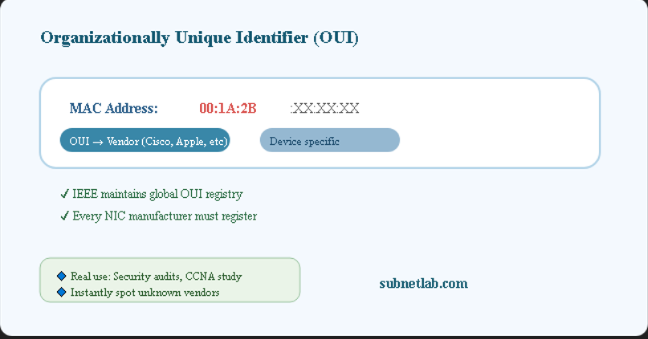
Why does OUI matter in real networking?
- Network security auditing—Spot unknown devices on your Wi-Fi just by their manufacturer.
- Hardware troubleshooting – Confirm if a device’s MAC matches the expected brand before debugging.
- Network inventory – Build accurate device lists by looking up MAC addresses from your router’s ARP table.
- CCNA / CompTIA study—Learn MAC structure hands-on for certification exams.
3. SubnetLab MAC Address Lookup Tool What Makes It Different

Most MAC lookup websites are slow, full of ads, ask you to sign up, or only search one way (MAC to vendor). SubnetLab’s tool is built differently — clean, fast, and completely free with no login required.
It queries the official IEEE OUI database plus a fallback from macvendors.com, giving you the most complete vendor results possible. And it does two-way lookup: you can search MAC to vendor OR vendor to MAC ranges.
Two-way lookup (vendor to OUI ranges) also works.
Instant results – no page reload, real-time
A dual database = higher accuracy
No signup—privacy first, no logs
Works perfectly on mobile for on-site work
Clean, ad-minimal interface
4. How to Use the Tool Step-by-Step Guide
- Open your browser and go to subnetlab.com/mac-address-lookup/ – no installs.
- Pick your search mode: MAC to Vendor or Vendor to MAC Ranges.
- Enter the MAC address (any format) or type a vendor name like “Cisco” or “Samsung.”
- Click the LOOKUP button—results appear instantly with the vendor name and OUI prefix.
- Use the info for network documentation, security checks, or studying.
5. MAC Address Formats the Tool Accepts
Unlike old tools that reject valid formats, SubnetLab accepts them all automatically:
| Format Name | Example | Common Usage | Supported |
|---|---|---|---|
| Colon- Separated | AA:BB:CC:DD:EE:FF | Linux, macOS, Wireshark | Yes |
| Hyphen- Separated | AA-BB-CC-DD-EE-FF | Windows ipconfig | Yes |
| Cisco Dot Notation | AABB.CCDD.EEFF | Cisco IOS | Yes |
| No Separator | AABBCCDDEEFF | Programming / compact | Yes |
| OUI Only (first 3 octets) | AA:BB:CC | Quick vendor check | Partial (vendor lookup works) |
6. Practical MAC Address Lookup Scenarios for IT Professionals & Students

- Network admins: Review router client lists and instantly spot unknown devices.
- Security engineers: During forensics, trace unauthorized access back to device makers.
- Students (CCNA, Net+): See OUI lookups live, making MAC concepts stick.
- Field techs: On-site, enter MAC from a switch port or device label—know exactly what it is.
- Home users: Solve the “Unknown Device” mystery on your home router.
- IT asset managers: Match MAC exports from network tools to manufacturer data for accurate inventory.
7. SubnetLab vs. Other MAC Lookup Tools
| Feature | SubnetLab Tool | Many other tools |
|---|---|---|
| Two-way search (MAC to Vendor & Vendor to MAC) | Yes | Usually only one direction |
| Dual database (IEEE + macvendors fallback) | Yes | Single source, misses new OUIs |
| Requires signup or API key | No, free forever | Often email or paid |
| Accepts all MAC formats | Yes (colons, hyphens, dots, none) | One rigid format only |
| Mobile-optimized | Fully responsive | Desktop-only or broken |
| Privacy: logs search inputs | Never stored | Many log and sell data |
| Ad clutter / intrusive ads | Minimal & clean | Heavy ads that slow down |
8. Common OUI Vendors You’ll Recognize
| Vendor / Manufacturer | Example OUI prefix | Where you’ll see it |
|---|---|---|
| Apple Inc. | 3C:22:FB | iPhone, MacBook, AirPort |
| Cisco Systems | 00:1A:A1 | Enterprise routers, switches |
| Samsung Electronics | 00:07:AB | Android phones, Smart TVs |
| Intel Corporation | 8C:8D:28 | Wi-Fi adapters in laptops |
| TP-Link Technologies | 98:DE:D0 | Home routers, extenders |
| Aruba Networks (HP) | 00:0B:86 | Enterprise Wi-Fi access points |
| Raspberry Pi Trading | DC:A6:32 | Raspberry Pi boards |
| Espressif Inc. | 30:AE:A4 | ESP8266 / ESP32 IoT modules |
MAC Spoofing alert: Some devices may fake a MAC address. If a lookup shows an unexpected vendor, it could be spoofing—a valuable clue for security investigations.
9. Frequently Asked Questions
What is a MAC address used for?
It’s used for local network communication
Switches and routers use MAC addresses to deliver data to the right device
within your home or office network.
Can I change my MAC address?
Yes, some operating systems allow “MAC spoofing” for privacy. But the original hardware address is burned into the device. SubnetLab helps you spot if a device is using a fake MAC.
Is MAC address lookup 100% accurate?
Yes, when you query the official IEEE OUI database, you get the registered manufacturer. However, large companies sometimes have multiple OUI prefixes. SubnetLab’s dual database gives you the most complete match.
Does SubnetLab store the MAC addresses I search?
No. The tool is privacy-first: your inputs are never logged or stored. No account, no tracking.
Can I search by vendor name to get MAC ranges?
Absolutely. Use “Vendor to MAC Ranges” mode, type “Cisco” or “Intel,” and you’ll see all OUI prefixes assigned to that manufacturer.
10. Conclusion: MAC Lookup Is a Core Skill – Use SubnetLab for Free
A MAC address isn’t just random hex digits—it’s a key to knowing exactly what hardware is on your network. Learning to look up OUI information helps network admins, security pros, and students succeed.
SubnetLab’s free MAC Address Lookup tool makes it instant, accurate, and hassle-free: two-way search, dual databases, no account required, and any MAC format. Whether you’re auditing your home Wi-Fi, studying for a certification, or troubleshooting a corporate switch, this tool saves you time.